ryanm39692799
Participant
December 26, 2018
Answered

Exporting 2 minute video takes 7 hours

  • December 26, 2018
  • 4 replies
  • 4823 views

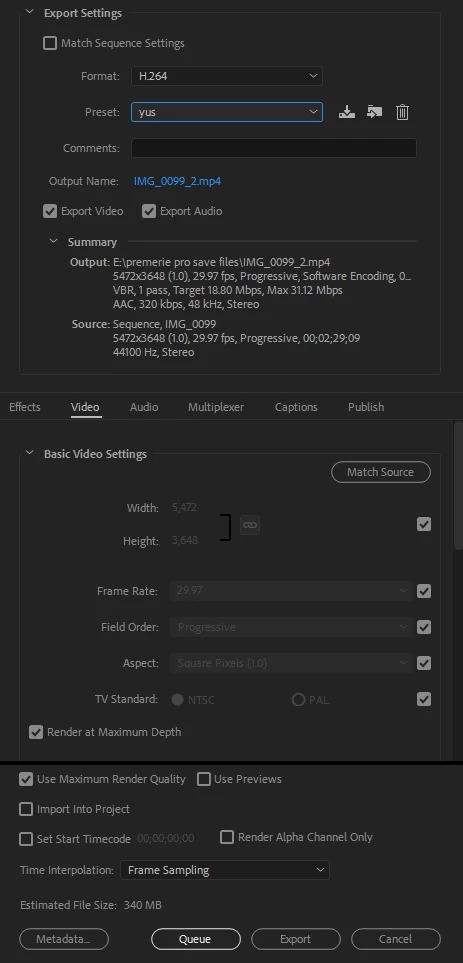
I am trying to export a 2 minute video and it says the estimated time will take 7 hours and 50 minutes. It used to not be like this but something changed and premiere pro is severely laggy. I did not change any settings and started today. When i export the window says encoding IMG_0099 ( a picture i used in the video ) any help would be appreciated thank you.
This topic has been closed for replies.
Correct answer Ann Bens


No wonder it will take so long.

Your sequence settings and export are huge. It is set with max depth and max render

Do you need such dimensions?

4 replies

Inspiring
December 27, 2018

I'm assuming your sequence settings are huge too. Maybe check the dimensions of the sequence etc but the suggestions to export in Cineform is a great indicator to see if something is truly wrong.

Community Expert
December 27, 2018

try lowering your dimensions as Ann said and try to export to Quick Time GoPro Cineform instead of H.264.

if you need H.264 then make another export out of the Cineform export, it would be much softer and faster this way.

Mike Dziennik
Community Expert
Community Expert
December 26, 2018

Check your project settings haven't reverted to software rendering.

Inspiring
December 26, 2018

First of all, you should add your system and app details so people can see what you're working with. Also is this exporting right out of Premiere or using Media Encoder?

Re: that image. I would make sure it's not 300dpi, non-RGB or just a very large file as these can all cause problems on most video editing platforms. If it is too large, simply take it into Photoshop (or whatever you use for image editing) and reduce the image to a more appropriate dimension and resolution for your video i.e. 1920 x 1080 for HD etc. DPI should be 72 and it should be in an RGB colorspace.

If that fails then consider this: Many people experienced issues when updating to the latest version of Premiere Pro. Did you recently update?

Ann Bens
Community Expert
Community Expert
December 26, 2018

Premiere does not understand dpi. Dpi is for printing. All Premiere understand is height and width in pixels.

If one uses an image best is to make it the same as the sequence or twice the size for panning/zooming.