
Participant
May 28, 2025
Question

Exporting audio stretches it. Exporting video works fine.

  • May 28, 2025
  • 2 replies
  • 189 views

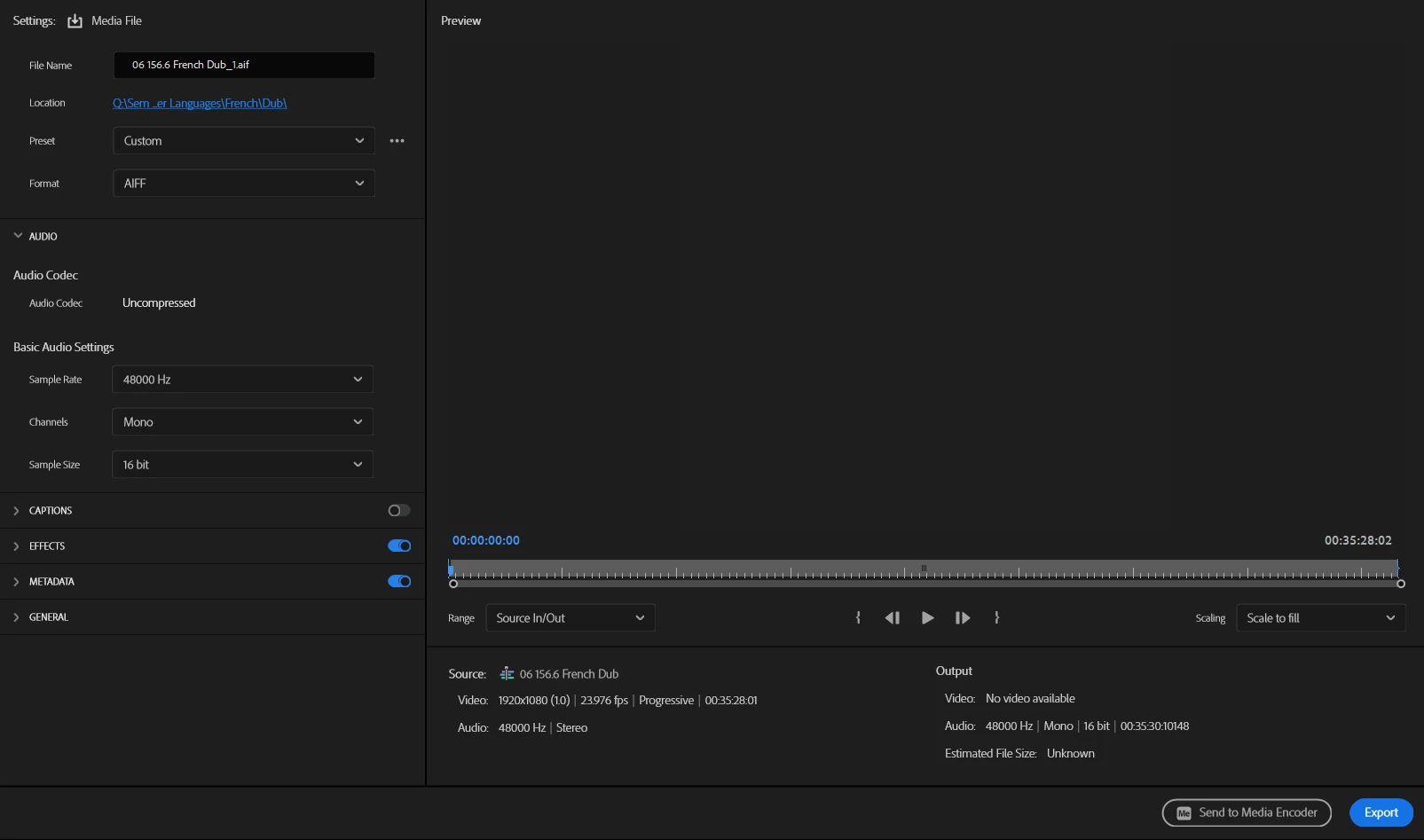
Exporting a 35-minute video into an audio format stretches it by two seconds. This is a big issue for me because, for the last 12 years, I've run a workflow of:

> Arrange audio and video in a sequence
> Export audio as AIFF, edit in Audition
> Reimport edited audio back into Premiere

I've never seen this issue before. Screenshot shows my current export settings and the resulting time issues. Can anyone help?


I'm running Premiere 25.2.3, rolling back would cause serious issues since I've done a ton of work in the last several days in this version.


2 replies

AachorAuthor
Participant
May 28, 2025

I suspect there is something wrong with how Premiere is figuring the length of the sequence. If I export the sequence as video, Premiere tells me that it's exporting 35:28;01, which is the length reported in the timeline. But then when I open the exported video in any other program, including Handbrake, I'm told that the video is 35:30 long, which is what Premiere is telling me when I go to export just the video.

This wouldn't be an issue except that a 2-second discrepancy on the timeline is making it impossible to send audio to Audition and then bring it back and have it still syncronized. 

R Neil Haugen
Legend
May 29, 2025

Is there a drop frame issue here? Is the sequence drop frame or non-drop frame?

Everyone's mileage always varies ...
R Neil Haugen
Legend
May 28, 2025

It would be helpful to know the framerate of the original media and sequence, also.

Everyone's mileage always varies ...
AachorAuthor
Participant
May 28, 2025

Everything from the camera to export is 23.976, 48kHz.