
Participating Frequently
March 29, 2017
Answered

Exporting Closed Captioned video for YouTube playback (Premiere Pro 14.9 and earlier)

  • March 29, 2017
  • 1 reply
  • 2411 views

Hello guys,


I have a video with closed captions in my timeline.


I go File/Export/Media.

Choose QuickTime (HD 1080, H.264..)

Then I go to Captions tab and choose "Embed in Output File".


Open that file in QuickTime.

Go to View/Subtitles/EnglishCC.

All looks good, captions are there.


But when I upload that .mov file to YouTUbe, Closed Captions are gone.


Is there any trick, so that the captions stay enabled after uploading the video to YouTube?


Thank you so much for any tip or advise.


Paul
This topic has been closed for replies.
Correct answer quirky_Glow157F

Youtube likes .scc (Scenarist Closed Caption) files. Supported subtitle and closed caption files - YouTube Help

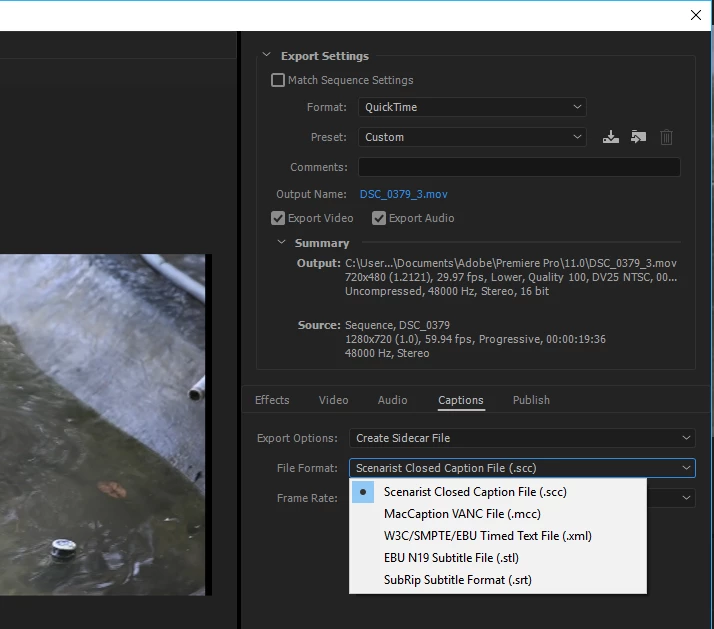
.scc files can be created by choosing Create Sidecar File instead of Embed in Output File

After you upload the video to Youtube, you can add the closed caption file :
Video Manager > Edit> Subtitles/CC > Add New Subtitles or CC > Upload a File > Subtitles File.

1 reply

quirky_Glow157FCorrect answer
Participating Frequently
March 29, 2017

Youtube likes .scc (Scenarist Closed Caption) files. Supported subtitle and closed caption files - YouTube Help

.scc files can be created by choosing Create Sidecar File instead of Embed in Output File

After you upload the video to Youtube, you can add the closed caption file :
Video Manager > Edit> Subtitles/CC > Add New Subtitles or CC > Upload a File > Subtitles File.

Participating Frequently
March 29, 2017

THANK YOU so much for the advise.

I am almost there, have .scc uploaded to YouTube video. I can see all the captions with the time code beside the video, but they are not showing up in the video. (even when I click CC button in the video to enable it). So I see the captions are uploaded and published, but they are not visible in the video.

BTW, during the publishing process, this warning came up " This transcript may contain additional formatting that can get lost if overwritten."

Any idea what I do wrong?

Again, THANK YOU SO MUCH for your support, I really appreciate it.

Best,

Paul