Participant
May 7, 2020
Answered

Exporting File: Estimated file size less than 1MB and won't open

  • May 7, 2020
  • 1 reply
  • 3237 views

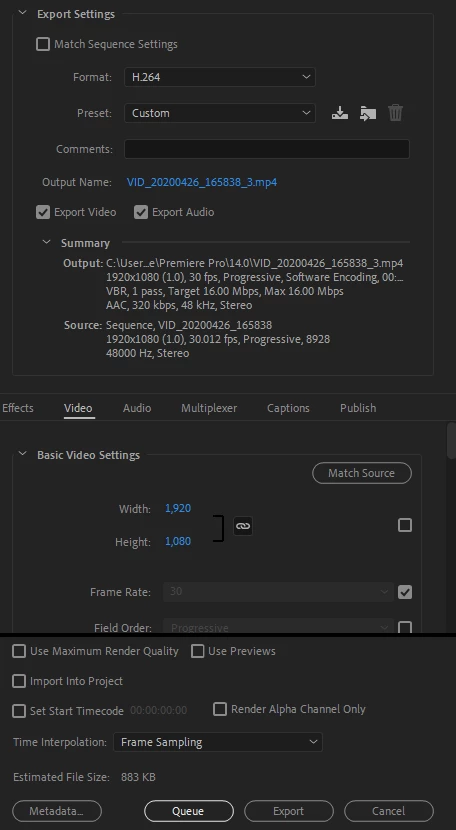
Hi,  I'm a very new Premiere Pro user and having trouble exporting a video.  I'm not sure what happened as I have already exported several high quality videos with no problem using the right H.264 settings. I've research my problem and can't seem to find anything.  The estimated file size is showing up as only 833K when I believe it should be somewhere closer to 600MB.  I've pasted below my export settings.


Any help would be greatly appreciated!


This topic has been closed for replies.
Correct answer Phillip Harvey

Do you have in and out points or a work area set in your timeline that is restricting your export to a small portion?

I can see that your sequence is set to frames rather than timecode and at 30fps I'm guessing your whole timeline is about 5 mins long?

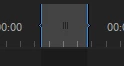
Go into your timeline and see if you have something like this in there:

You can either set your in and out points to the area you want to render, or right click on the timeline ruler and clear the in and out points.

1 reply

Phillip HarveyCommunity ExpertCorrect answer
Community Expert
May 8, 2020

Do you have in and out points or a work area set in your timeline that is restricting your export to a small portion?

I can see that your sequence is set to frames rather than timecode and at 30fps I'm guessing your whole timeline is about 5 mins long?

Go into your timeline and see if you have something like this in there:

You can either set your in and out points to the area you want to render, or right click on the timeline ruler and clear the in and out points.

Participant
May 8, 2020

This was exactly it!  Thanks so much!