Participant
August 28, 2018
Answered

Exporting Multichannel Audio panned left and right

  • August 28, 2018
  • 2 replies
  • 8710 views

Hey! I have to following problem:

I need to export a project for broadcasting. They need 4 audio channels, exported with MXF OP1a

Channel 1: Audio Left

Channel 2: Audio Right

Channel 3: Just the ambient noice Left

Channel 4: Just the ambient noice Right

Now following this guide it works perfectly within Premiere Pro: The Video Road – Multichannel Audio in Premiere Pro

This gives me what I want within Premiere. I have my audio in 1 only on my left ear and in 2 only on my right, same with 3 & 4.

However, once I export the video, 1 & 2 / 3 & 4 are either mixed together in BOTH channels or 1 & 2 / 3 & 4 are both mono without the applied pan, now being played on both ears.
I am not sure which one it is - but I know that the audio is twice as loud as before every time. Its just no longer panned - both channels now have sound on both ears. If I import it into a new sequence in Premiere, the info that one channel was supposed to be only on the left seems to be lost. 

How do I fix this? Is this a mistake on my part or is Premiere Pro not exporting the meta data that provides the info that they are panned left or right?

If so, how do I get around that?

Thanks!
    This topic has been closed for replies.
    Correct answer Jarle Leirpoll

    Hey Jarle,

    interesting. I do encounter the same problem with stereo tracks with one side being silent/set to just Left or Right. Or does Premiere interpret this as a mono track as well?

    So does Premiere just not allow multichannel exports with several pans then?

    Thank you so much!


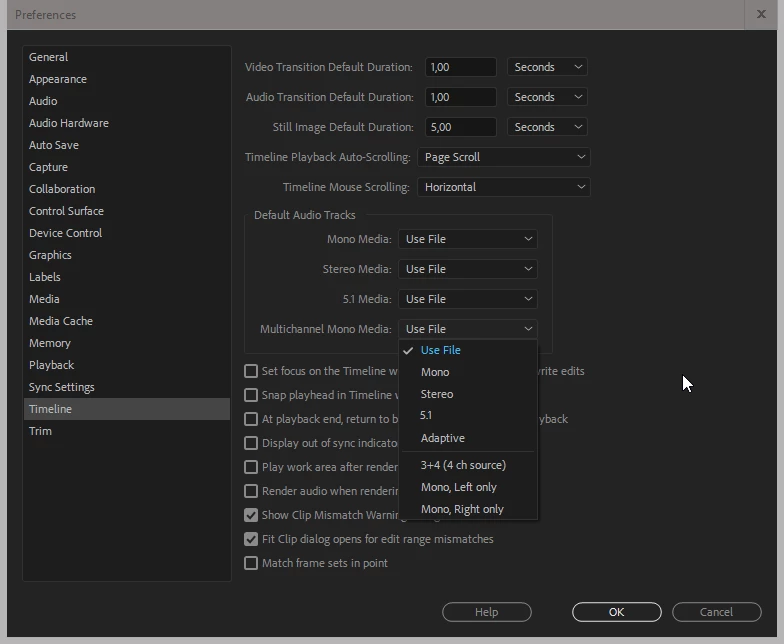
    You decide how Premiere interprets the audio yourself, so I have no idea how your Premiere Pro interprets audio. You'll have the answer in your Timeline preferences.

    So does Premiere just not allow multichannel exports with several pans then.

    It can export multi-track audio. You don't have much control over how video player software interprets these tracks, and how they're panned. A broadcaster may want 8 tracks, where the first two are stereo, and the rest are mono. When they use it, they will have their software set up to pan some tracks to the center and some to left or right.

    Premiere itself will interpret them as mono by default if you re-import the files, but you can change this, and you can also pan them any way you want. But if you want the audio to be panned in a certain way when you edit or play the timeline, you will have to have a sequence set up correctly, with Multi-channel output, not stereo or 5.1, and all the tracks must be routed correctly. If you have this, you can just drop the file in the sequence and hit Play.

    Remember: All this is just metadata. In the end they are all just tracks of audio. All of them are the same!

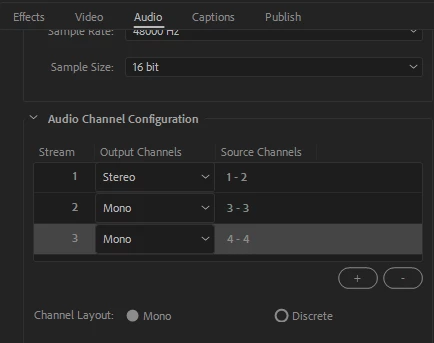
    A stereo pair is just two mono tracks tagged in the metadata as stereo. Because of this metadata tag, most players know what to do with them, and will pan them left and right. The panning of multi-track audio can only be tagged in the MOV container. See screen shot of Audio tab in Export Settings.

    That doesn't mean other formats won't work. If the playback software is set up accordingly, everything will be panned correctly. They're all just audio tracks, anyway. But that's not something you can do when you export, it's something they do in their software.

    2 replies

    Legend
    August 28, 2018

    Can you provide a screen shot of your Sequence settings and your export settings (showing the audio tab)?

    RobBubbleAuthor
    Participant
    August 31, 2018

    Hey!
    Thank you for the quick response.

    As you can see this is set to Multichannel, 4 Tracks, Audio 1 / Audio 2 are set to 1 & 2, and 3 / 4 are set to 3 & 4. 1 & 3 and 2 & 4 are panned left and right respectively.

    This works perfectly. In Premiere I get the sound from 1 on the left and from 2 on the right and so on.

    I export with this:

    However when I listen to the file or import it again in Premiere now the channels are no longer pannend left / right. They are all playing both left and right. It seems like Premiere is not saving this information on export or is exporting it as both left and right channels.

    I tried it without the panning, by just using a stereo file and muting the left or right channel respectively. This works if you export only one channel (I get perfect audio only left and not right), but as soon as several channels are involved, the information seems lost and I get a file where every channel is now both left or right, even though it was working perfectly in Premiere like it was intended.

    Thank you!

    Legend
    September 1, 2018
    However when I listen to the file or import it again in Premiere now the channels are no longer panned left / right. They are all playing both left and right. It seems like Premiere is not saving this information on export or is exporting it as both left and right channels.

    That sounds like a normal behavior. Mono tracks are panned to the middle by default. Also, when panned to the middle, their level will be reduced by 3dB because they're now in two speakers.

    If you want the imported mono tracks to be panned left/right and to 1-2-3-4, you will have to put the clip in a timeline where this routing is already done.

    In short, if I'm not misunderstanding something, I believe your export is working as it should.

    R Neil Haugen
    Legend
    August 28, 2018

    May be Jarle Leirpoll​ can pop in ... he's very good at this stuff!

    Neil

    Everyone's mileage always varies ...