Participating Frequently
November 19, 2018
Answered

Exporting Open Captions to .SRT Files (Premiere Pro 14.9 or earlier)

  • November 19, 2018
  • 1 reply
  • 4621 views

Hi, I'm new to creating my own captions. I created open captions in Premiere Pro and would like to export an .SRT file. However, when I click Export>Captions, the option is greyed out. When I Export>Media> Captions, it still won't let me selected >SRT.
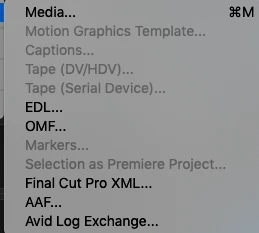
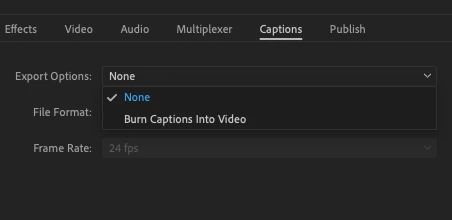
How do I export the .SRT files?

This topic has been closed for replies.
Correct answer Stan Jones

You must select the caption stream you want to export in the project panel. Then you should see the captions option under export. You cannot export an open caption stream from the timeline.

1 reply

Stan Jones
Community Expert
Stan JonesCommunity ExpertCorrect answer
Community Expert
November 19, 2018

You must select the caption stream you want to export in the project panel. Then you should see the captions option under export. You cannot export an open caption stream from the timeline.

sghaddenAuthor
Participating Frequently
November 19, 2018

Can I change the caption stream after I've already made the open captions?

(And how do I do that)? What should the caption stream be?

Thank you!

Stan Jones
Community Expert
Community Expert
November 19, 2018

Open captions to anything else. You can convert almost any other format to open caption. Another option is to export your stream, and converted in some other programs such as subtitle edit.

Edit: On the road and did not edit my voice to text! Should have been: "You cannot change Open Captions to anything else."