NO!!!!!!!!!
This is the WRONG solution ... do NOT EVER add LUTs to the program/package files locations! They do have a specific location for users to add, which does NOT screw up things like this does. In several other ways you haven't even encountered yet.
The items in the package/program locations are expected to be exactly the same in ALL the video apps, Premiere Pro, AfterEffects, MediaEncoder, and Prelude. They are not accessed by name, but by relative location sorted computer alpha-numeric. In other words, if you use the 6th one down in Premiere, no matter the name! ... MediaEncoder, Ae, and Pr will use the 6th one down.
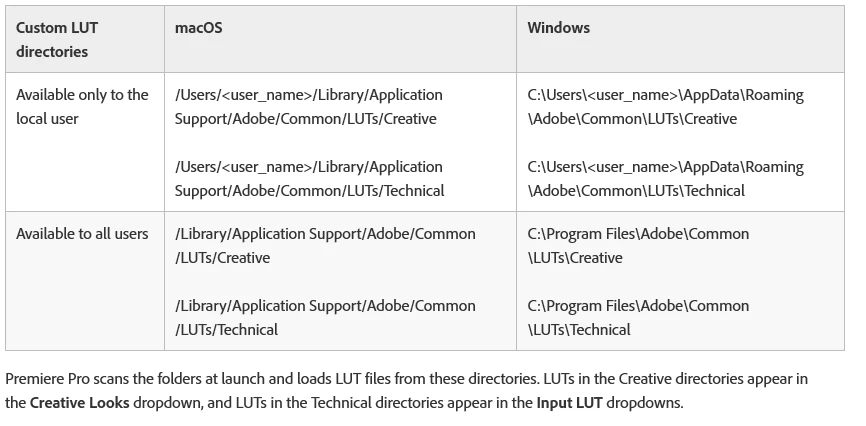
All users should park their own LUTs in the specified location as shown in the chart below ... note, you need to add the final folder in each tree, the Technical (for the Basic tab LUT dropdown) and the Creative (for the Creative tab LUT dropdown).
Using this setup, ALL the apps will access the LUT by name ... properly. I also setup an icon shortcut on the desktop so I can quickly get to these folders to add or delete LUTs. Plus, I add a suffix ... number and letter ... to serve two functions: first to get mine showing first, and second to organize them.
Something like:
01 A low-sat neutralize
01 B high-sat neutralize
07 A high contrast shadows/low highlights
Neil



 AdChoices