
Inspiring
July 11, 2023
Question

Exporting (& rendering) extremely slow (Task Manager shows low CPU & practically no GPU utilization)
  • July 11, 2023
  • 13 replies
  • 1842 views

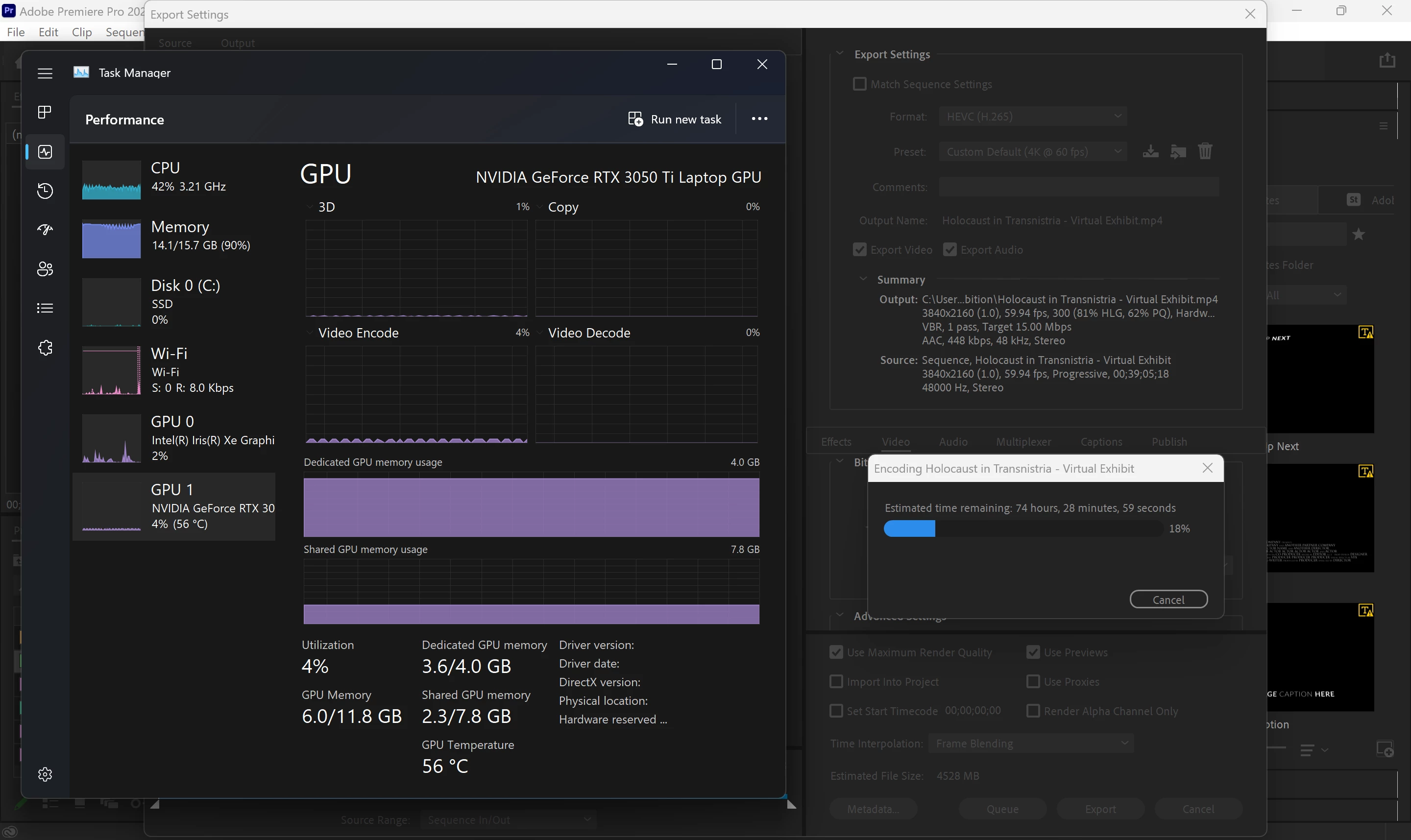
How could this be right?..
It's already been rendering for over 24 hours.  18% is like a little over 7 min...

The first third of the video consists of a title/text introduction and then images which, for the most part, only have the Y-coordinate automated to slide across the screen.  Whatever the case, this is obviously unacceptable and doesn't make sense...  I don't understand why the software would be so poorly optimized by default (I'm fairly sure I otherwise have all the settings right but would love and hope that I'm mistaken).

PS- As you can see in the image, I have an NVIDIA 3050 Ti.  The CPU is an Intel i7-12700H.

This topic has been closed for replies.

13 replies

R Neil Haugen
Brainiac
July 11, 2023

Because as RJL noted, the vRAM is maxed out. It can't "go" faster.


Unfortunately, 4GB of vRAM is really not enough for UHD sequences with effects applied these days.

Everyone's mileage always varies ...
Inspiring
July 11, 2023

Thanks for the reply.  Yes, I noticed that, but because other things/programs are simultaneoulsy working and runing fine, I didn't think that was exactly the issue.  I mean, I remember on my other systems I had the same amount of RAM and there wasn't this problem, but yeah, if that's really what it is, then I guess that's that.  I just didn't think that would  be the problem for rendering/exporting.

If the GPU VRAM is maxed out, how come there's barely (if any) load on it?

Brainiac
July 11, 2023

It looks like you do not have enough system RAM and graphics VRAM for your particular render job. The screenshot is so simple: Your main system RAM usage is almost maxed out while your graphics VRAM usage is pegged to the max. This will slam your entire system into the ultra-slo-mo operating mode for the remainder of your export job (very little CPU or GPU usage but nearly maxed out total RAM and VRAM usage).


In other words, you definitely need a PC with much more RAM and a GPU with much more VRAM for this particular job.