
Participant
June 3, 2022
Answered

Exporting transparent video in Premier Pro 2022

  • June 3, 2022
  • 3 replies
  • 55093 views

Hi, can anyone help me with exporting a video with a transparent background in the latest version of Premeier Pro (2022)


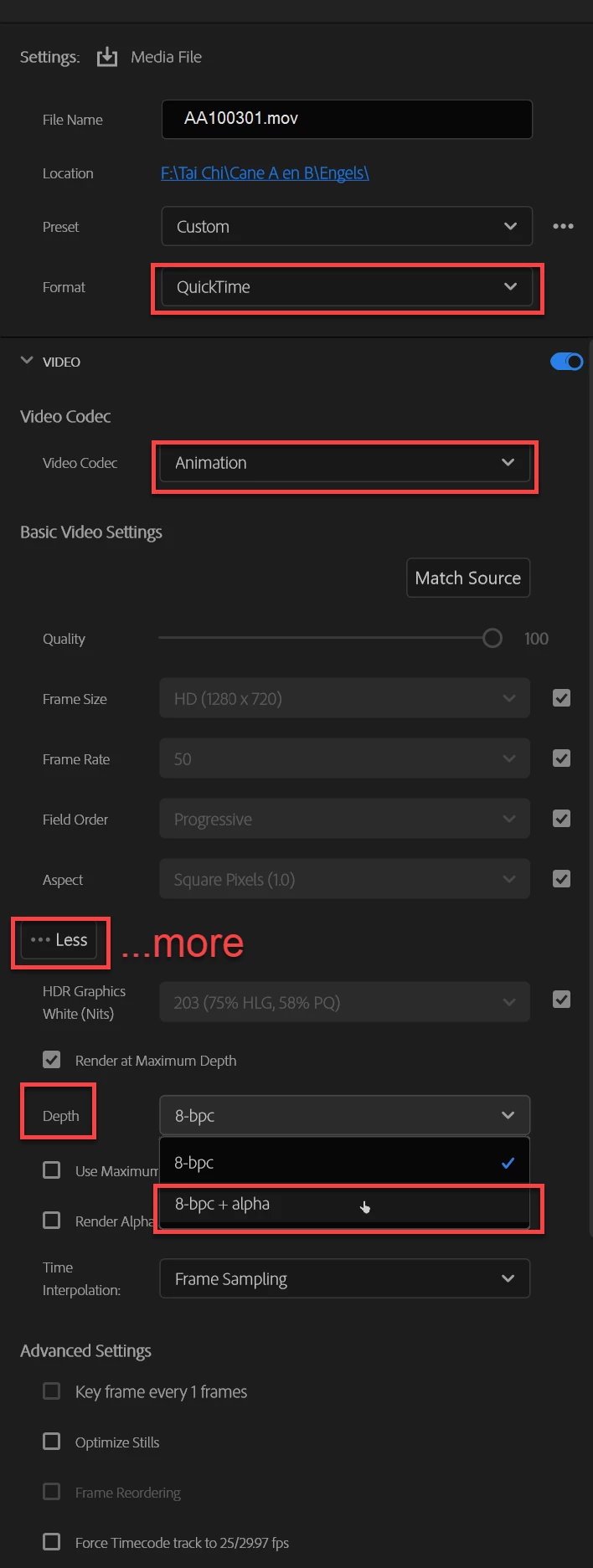
You used to be able to export in Quicktime, with checkbox for rendering at 8bpc with an alpha channel; however the alpha channel check box appears to have been removed in the latest version. 


Does anyone know of another way to do this?


Thanks in advance
This topic has been closed for replies.
Correct answer Ann Bens

It's not gone, just hidden under More.


3 replies

Inspiring
June 3, 2022

Or, if you want to export it and add back to premiere, you can right click your clip -> Render and replace, for transparent format you can choose Quictime and choose the preset.

######Raizen 7, 40Gb Ram, RTX 3060, Win 11 -- All of Software in the world are just tools. Buy it if it works for you :)
Kevin-Monahan
Community Manager
Community Manager
January 10, 2024
quote

Or, if you want to export it and add back to premiere, you can right click your clip -> Render and replace, for transparent format you can choose Quictime and choose the preset.


By @Eko Wardoyo


Yes, use ProRes 4444 and you'll have the option.


Cheers,
Kevin

Kevin Monahan - Sr. Community & Engagement Strategist – Pro Video and Audio
Ann Bens
Community Expert
Ann BensCommunity ExpertCorrect answer
Community Expert
June 3, 2022

It's not gone, just hidden under More.


Participant
June 3, 2022

That is great, thanks for your help!

Community Manager
June 3, 2022

Hi stevenw42330476,


We're sorry about the poor experience. Please share a screenshot of the complete Export Settings. It will help us to understand the issue properly.


Thanks,

Sumeet

Participant
July 9, 2023

i cant get ut up to, im clicking on everyting but it will not come up for me 2..