
Participant
September 8, 2022
Answered

Extendscript plugin - Not able to set end marker

  • September 8, 2022
  • 1 reply
  • 438 views

Hi
I'm experementing with setting clip markers (As in this example). I'm able to set the marker but when trying to set the endtime for the marker I get a parameter error although the type of the parameter is right(Time).

What is wrong here?


The offending line (As in the example):


newMarker.end			= tempTime;


I get :


Eval Error (#1): "Illegal Parameter type" in '/Work related/Premiere/Plugin/FirstPlugin/host/index.jsx' [29:undefined] in host 'premierepro-22.0 (NewWorld)'.


This is how it looks in the VS code:
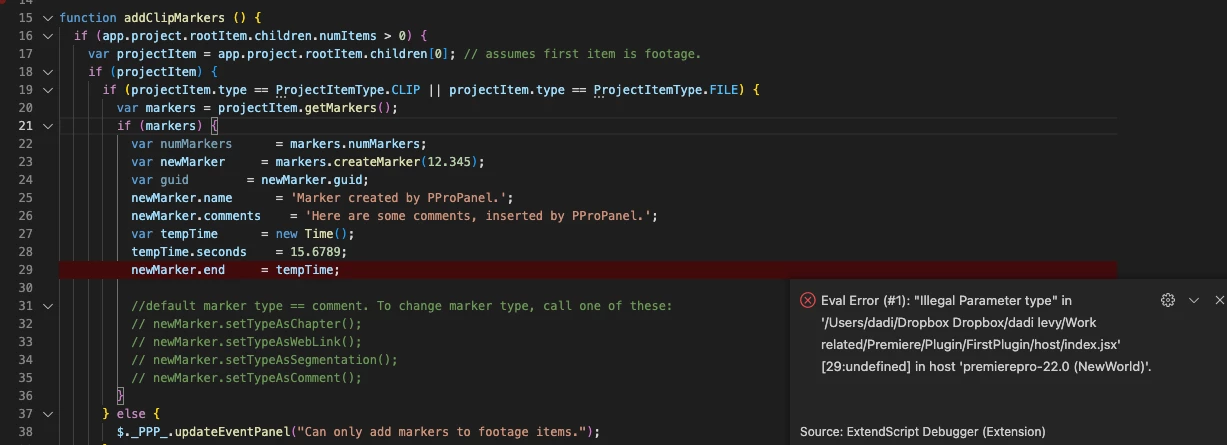
 

Seems like its premiere pro 22.0 (not sure what other versions to check)

This topic has been closed for replies.
Correct answer Bruce Bullis

Good news: It turns out it was the sample code*, not the API, that was the problem. 

This works: 


var activeSequence = app.project.activeSequence;
if (activeSequence) {
    var markers = activeSequence.markers;
    if (markers){
        var newCommentMarker		= markers.createMarker(12.345);
        newCommentMarker.end            = (newCommentMarker.start.seconds + 5.0);
    }
}


* Yeah, it was my sample code. 🙂


1 reply

Bruce Bullis
Community Manager
Bruce BullisCommunity ManagerCorrect answer
Community Manager
September 13, 2022

Good news: It turns out it was the sample code*, not the API, that was the problem. 

This works: 


var activeSequence = app.project.activeSequence;
if (activeSequence) {
    var markers = activeSequence.markers;
    if (markers){
        var newCommentMarker		= markers.createMarker(12.345);
        newCommentMarker.end            = (newCommentMarker.start.seconds + 5.0);
    }
}


* Yeah, it was my sample code. 🙂