



ExtendScript: `track.insertClip` placement offset depends on clip framerate
Steps to reproduce the issue:
- Say we have two clips: one at 16 fps and the same at 60 fps. I'll also attach a second pair of files:
scene1_16fps.mp4,scene1_60fps.mp4,scene2_16fps.mp4,scene2_60fps.mp4. Just in case, I'll attach MediaInfo for the files.Complete name : D:\temp\scene1_16fps.mp4
Format : MPEG-4
Format profile : Base Media
Codec ID : isom (isom/iso2/avc1/mp41)
File size : 8.82 MiB
Duration : 5 s 63 ms
Overall bit rate : 14.6 Mb/s
Frame rate : 16.000 FPS
Writing application : Lavf61.1.100
Video
ID : 1
Format : AVC
Format/Info : Advanced Video Codec
Format profile : High@L3.1
Format settings : CABAC / 4 Ref Frames
Format settings, CABAC : Yes
Format settings, Reference : 4 frames
Codec ID : avc1
Codec ID/Info : Advanced Video Coding
Duration : 5 s 63 ms
Bit rate : 14.6 Mb/s
Width : 720 pixels
Height : 1 280 pixels
Display aspect ratio : 0.563
Frame rate mode : Constant
Frame rate : 16.000 FPS
Color space : YUV
Chroma subsampling : 4:2:0
Bit depth : 8 bits
Scan type : Progressive
Bits/(Pixel*Frame) : 0.991
Stream size : 8.82 MiB (100%)
Writing library : x264 core 164 r3191 4613ac3
Encoding settings : cabac=1 / ref=3 / deblock=1:0:0 / analyse=0x3:0x113 / me=hex / subme=7 / psy=1 / psy_rd=1.00:0.00 / mixed_ref=1 / me_range=16 / chroma_me=1 / trellis=1 / 8x8dct=1 / cqm=0 / deadzone=21,11 / fast_pskip=1 / chroma_qp_offset=-2 / threads=32 / lookahead_threads=5 / sliced_threads=0 / nr=0 / decimate=1 / interlaced=0 / bluray_compat=0 / constrained_intra=0 / bframes=3 / b_pyramid=2 / b_adapt=1 / b_bias=0 / direct=1 / weightb=1 / open_gop=0 / weightp=2 / keyint=250 / keyint_min=16 / scenecut=40 / intra_refresh=0 / rc_lookahead=40 / rc=crf / mbtree=1 / crf=10.0 / qcomp=0.60 / qpmin=0 / qpmax=69 / qpstep=4 / ip_ratio=1.40 / aq=1:1.00
Codec configuration box : avcC - Create a sequence at 60 fps. Place all the mp4s into the Project.
- Run the code:
var project = app.project;
var rootItem = project.rootItem;
var scene1_16fps_item = rootItem.children[0];
var scene2_16fps_item = rootItem.children[1];
var scene1_60fps_item = rootItem.children[2];
var scene2_60fps_item = rootItem.children[3];

var seq = project.activeSequence
var track = seq.videoTracks[0]
var track2 = seq.videoTracks[1]
// remove all
for (var i = track.clips.numItems - 1; i >= 0; i--) {
    var clip = track.clips[i];
    clip.remove(false, false);
}
for (var i = track2.clips.numItems - 1; i >= 0; i--) {
    var clip = track2.clips[i];
    clip.remove(false, false);
}

var time = new Time()
var targetSeconds = 0.3749
//var targetSeconds = 0.38;
var targetTicks = targetSeconds * 254016000000;
time.ticks = targetTicks.toString()

scene1_16fps_item.setOutPoint(time, 1)
var newClip11 = track.insertClip(scene1_16fps_item, 0);

scene1_60fps_item.setOutPoint(time, 1)
var newClip21 = track2.insertClip(scene1_60fps_item, 0);

var newClip12 = track.insertClip(scene1_16fps_item, time);
var newClip22 = track2.insertClip(scene1_60fps_item, time);
What it does: places the first clip
scene1starting at frame 0, cut at0.3749s. Then places the next two clips at the same time offset. -
Expected behavior: first clip ends at
0.3749 × 60 = 22.494 ≈ 22frames. Next clip starts immediately after.
Actual behavior: 60 fps clips are placed correctly; 16 fps clip has a gap of 4 (!) frames.
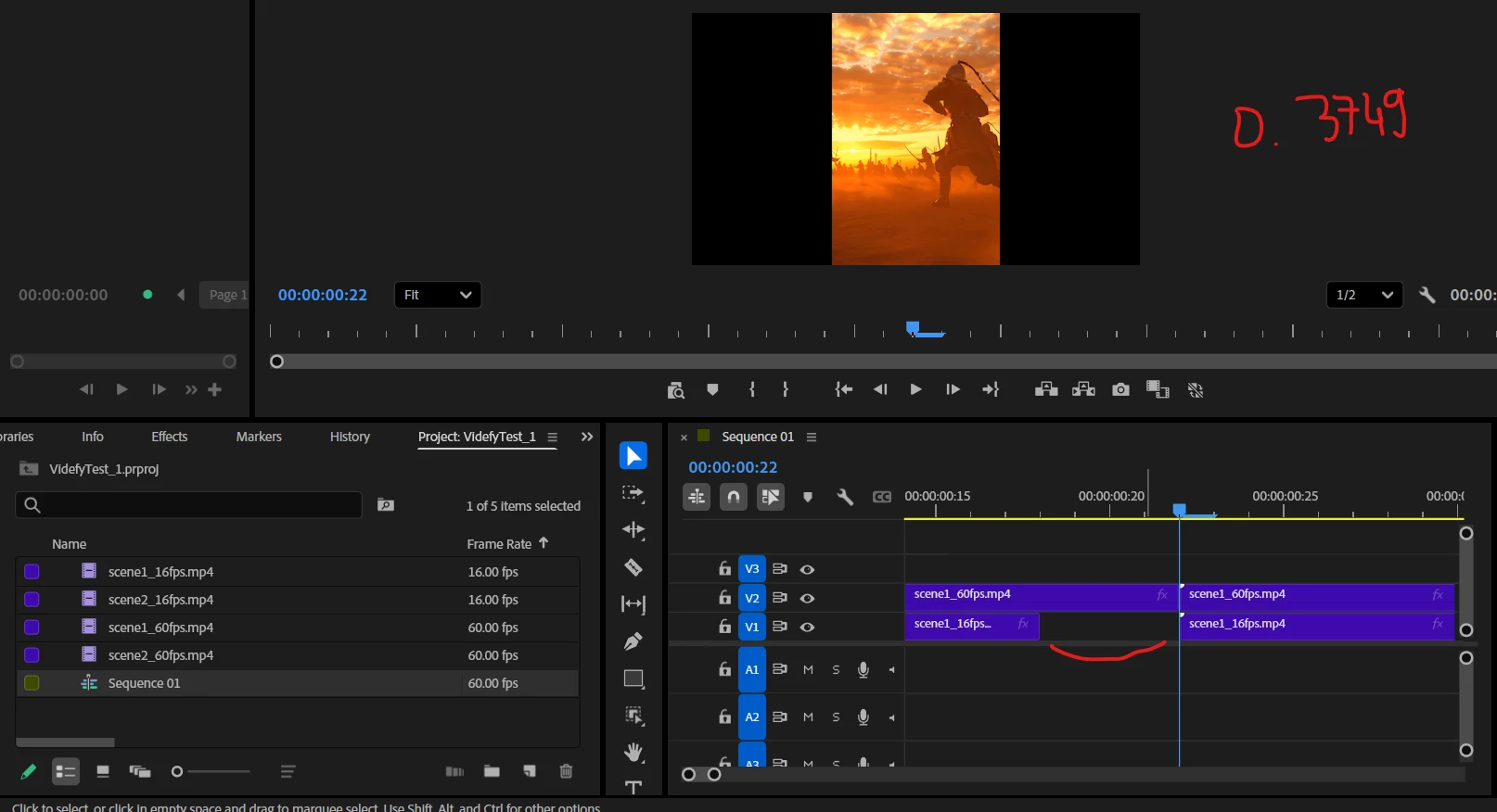
time = 0.3749s -
You can change the value to
0.38and see that both first clips end at frame 22 and both second clips start one frame later - which is also incorrect.
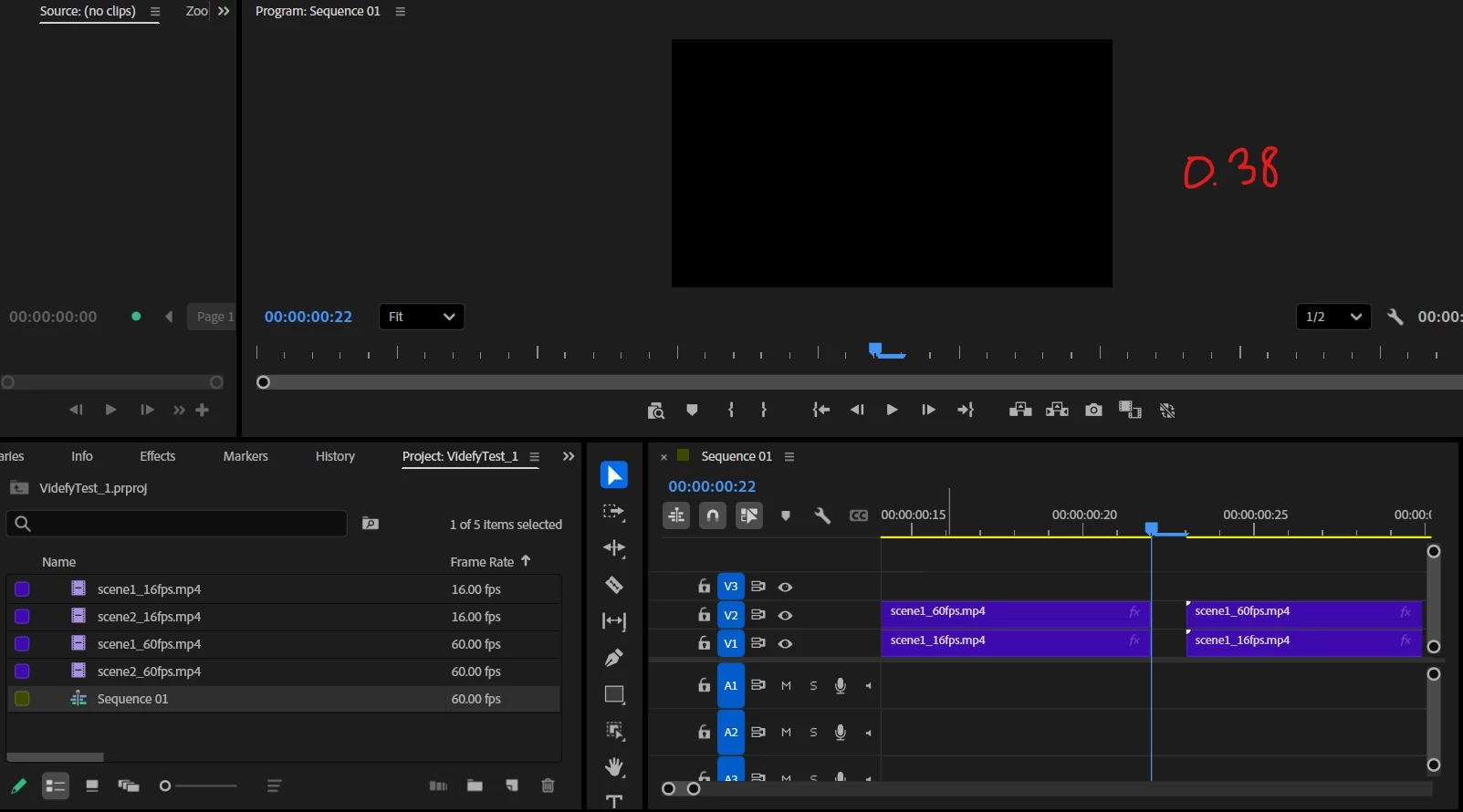
time = 0.38s -
No matter what I try, I always get missing frames (1-4) whenever I have a clip whose out-point ends at time
X(while the source is longer thanX) and the next clip starts at the sameX. I also tried exotic formulas likevar roundedSeconds = Math.round(targetSeconds * srcFps) / srcFps, but that didn't help either.Any ideas what math is happening under the hood? How do I place clips without gaps, matching my script's time data, using ExtendScript?
 AdChoices