zuzullo
Participating Frequently
January 11, 2012
Answered

Extract ALL frames to JPEG

  • January 11, 2012
  • 4 replies
  • 34715 views

How can I extract all frames from a AVCHD clip to JPEG?

    This topic has been closed for replies.
    Correct answer Ann Bens

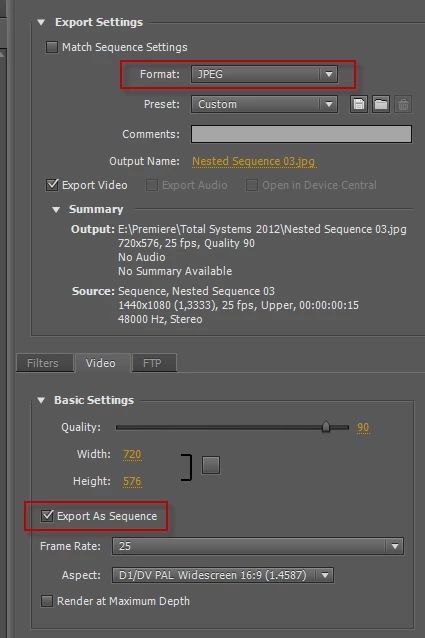
    http://content.screencast.com/users/zuzullo/folders/Jing/media/69a6301f-612b-4ff4-9ba5-0c253fce7f8c/2012-01-11_1822.png


    Export all frames in JPEG: works without any problem.
    4 replies

    Participant
    June 24, 2021

    There is an Easy way:
    1) Open Photoshop

    2) Goto: File > Import > Videoframes to Layers

    3) After Import in PS goto: File > Export > Layers to Files

    4) Choose your Filetype and Prefix

     🙂 et voila!

    Participant
    June 3, 2019

    I have a video of a PowerPoint presentation that had 40 slide. If I export sequential frames, it will give me thousands of images but only 40 unique images and rest all will be duplicates. Is there a way to get only those 40 unique frames?

    Ann Bens
    Community Expert
    Community Expert
    June 3, 2019

    One by one I am afraid.

    You can use the export frame option in the source or program monitor.

    yizid74759554
    Participant
    September 26, 2017

    hii all

    How can I control the amount of images I gonna export

    For example I have a video of 1 minute I get 1000 frames who need 1000 frames come on

    i need only 32 frames for example

    how can i control on it ???

    Legend
    September 26, 2017

    In and Out points will determine which parts get exported.

    yizid74759554
    Participant
    September 26, 2017

    hi jim

    tnx for relpy

    but i need to extract all video not only part of it

    i want to extract all video just by only 32 frames for example, not 1000 frames...

    Harm_Millaard
    Inspiring
    January 11, 2012

    You are gonna LOVE this: Manually.

    Let's just hope your time-line is a bit shorter than say 1 million frames.

    zuzullo
    zuzulloAuthor
    Participating Frequently
    January 11, 2012

    Are you sure?

    I heard there are people doing that in order to preciselly control the detail, using than Photoshop for doing so.

    Harm_Millaard
    Inspiring
    January 11, 2012

    Yeah.

    You could try to export sequential stills, using BMP or TIFF, but not JPEG. I wish you luck with controlling detail in PS with several thousands of still frames or a multitude of that.