Inspiring
December 28, 2022
Question

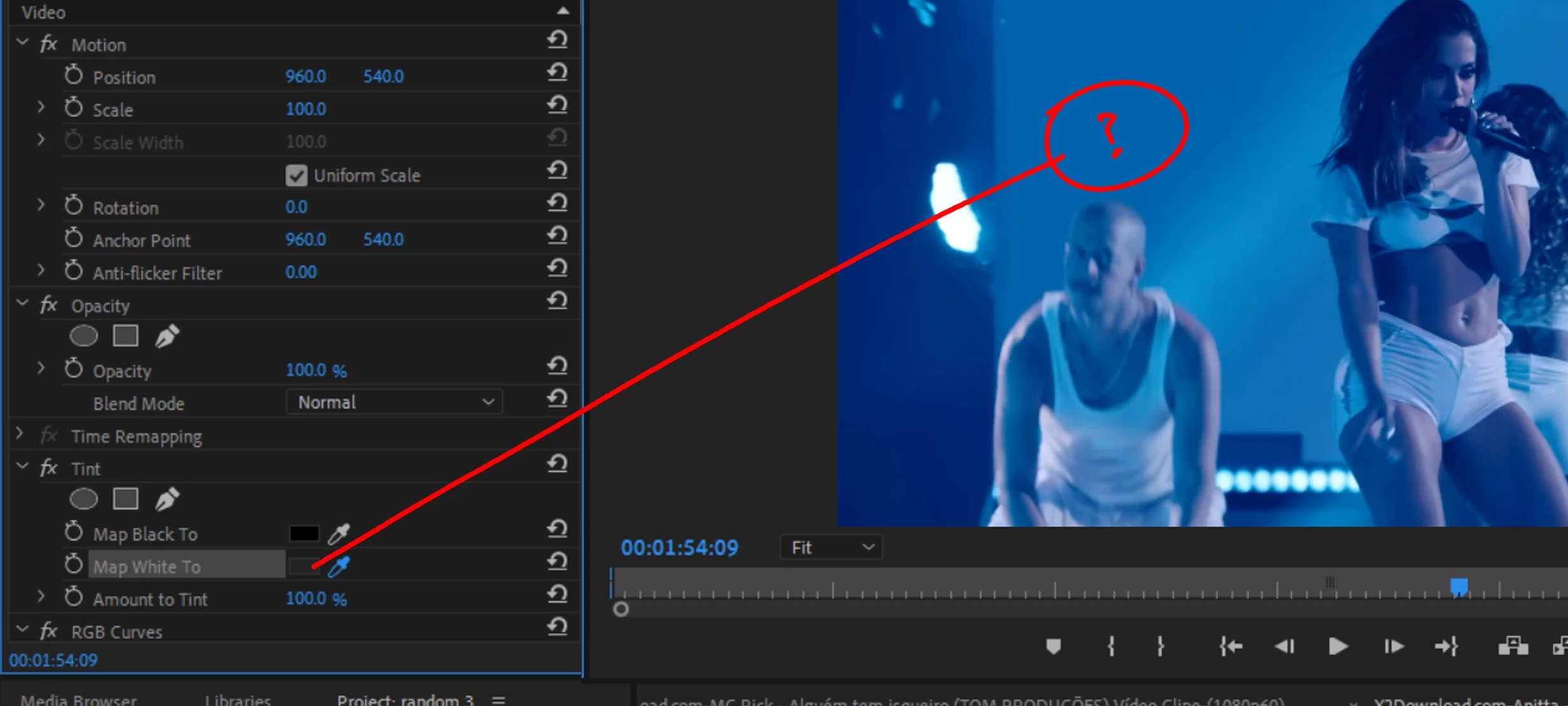
Eyedropper tool always grey

  • December 28, 2022
  • 3 replies
  • 1364 views

whenever i use the eye dropper tool  (normally in the 'tint' plugin, but in any plugin)

it is always grey no matter where i click.....


see image 
This topic has been closed for replies.

3 replies

Community Expert
December 29, 2022

Try holding down Command on Mac or Control on Windows when you try to sample the color that you want with the eyedropper. The eyedropper should be thicker. This usually works and selects a broader range of pixels.

R Neil Haugen
Legend
December 29, 2022

That works fine on my PC at this time, so I can't replicate. Puzzling of course, why the difference?


Also, always curious as to why people use certain tools ... so the RGB Curves, what do you do with that?


Neil

Everyone's mileage always varies ...
djmattyzAuthor
Inspiring
December 29, 2022

I was just using the curve for a quick way of brightening up the footage which can appear a bit too dark after using the tint plugin. I find the curves to be my go-to for that kind of thing, it gives me good control.  if premiere had a 'levels' plugin that worked like photoshop levels i might use that.. but its totally different.   I know Lumetri color has a curve on it, but its easier to type in the word "curve" because there are so many lumetri plugins an color plugins.


by the way Lumetri color is such a fundamental effect, i think it should be automatically on every channel, unnecessary work for a user to have to search for it every time. (i know you can save it as a user effect, but still)

R Neil Haugen
Legend
December 29, 2022

Thanks for the answer ... it's always fun hearing how others work. We are all different ...


And a comment ... in the Color workspace, the Lumetri panel is open ... as you go down the timeline, anytime you pause playback the clip under the playhead becomes 'selected'. At that point, any touch of the controls in the panel is applied to the clip, you don't 'go grab the Lumetri effect' ...


Fastest way to color in Premiere.


Neil

Everyone's mileage always varies ...
Ann Bens
Community Expert
Community Expert
December 29, 2022

Maybe need to change the stacking order with RGB curves (cannot see what it is doing and is obsolete).

djmattyzAuthor
Inspiring
December 29, 2022

no, its always the same, curves or no curves.

Ann Bens
Community Expert
Community Expert
December 29, 2022

Different region, different clips?