



Community Manager
May 22, 2020
Answered

FAQ: How to solve crash while using Export Settings in Premiere Pro v. 14.2?

  • May 22, 2020
  • 18 replies
  • 79899 views

Update: This issue has been fixed in Premiere Pro v14.3. Please download the latest update from the Creative Cloud Desktop app. 


We are investigating an issue where Premiere Pro v14.2 might crash or get in a non-responsive state while using the Export Settings window. This issue has been observed on systems using NVIDIA GPU not supporting NVENC. If you are using such GPUs and experiencing a crash or freeze while using the H.264/H.265 format, please follow these steps to fix it.


Navigate to Premiere Pro Preferences > Media and uncheck Enable hardware accelerated encoding and decoding. Restart Premiere Pro and try to export.
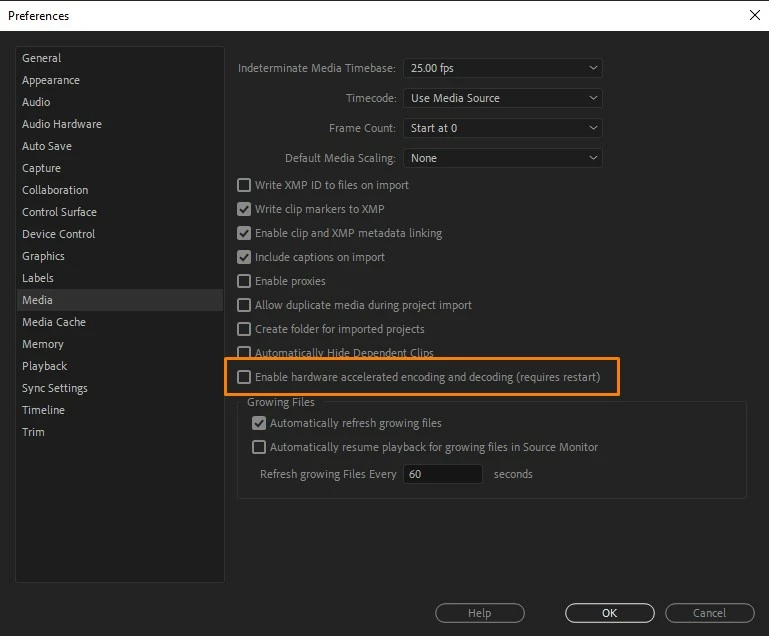
 

Hope it helps. If you are experiencing a crash while exporting with any other format/codec, please create a new community discussion and we will get that issue checked. 


Thanks, 

Sumeet



Correct answer Kevin-Monahan

Hi,

For those of you experiencing the issue brought up in this FAQ, take note! Please create a new post for your version of Premiere Pro. This post is already almost 2 years old!

Thanks,
Kevin

18 replies

richiefromboston
Participating Frequently
November 2, 2020

I have latest version PP2020 on all my computers, and every time i upload (30 min 4k) footage it crashes at the end   leaving me to wonder if it uploaded. And strangely its uploading duplicate videos everytime to youtube. Im using a razer blade pro 17 (6 core 2080 super) a razer blade studio 2020 (8 core  quadro 5000) and a threadripper desktop 32 core 128gb ramm TITAN RTX gpu) all same as far as not responding and duplicate uploads. 

Participating Frequently
November 2, 2020

That is a pretty serious build Richie. So your videos are exporting fine? It's the upload process to youtube that's the issue?


I still have massive issues exporting... let alone uploading. Especially if I use linked comps with After Effects, almost every time it's a guaranteed fail on export. 


Adobe really need to start taking these product issues seriously, I sent a crash report every single time I tried to export and it failed and not even one reply from the development team about anything!! Extremely disappointing, clearly they are happy with taking our money (and a substantial amount of it) and ignoring customer issues. 

account closed
Participating Frequently
July 26, 2020

Guys, since Adobe isn't even able to identify the problem, here is a little workaround: render your movie video only first, and audio only second. And than put those two single files together in a new sequence. The issue seems to appear after a certain amount of time and is caused by the audio track i assume. Since the single audio file renders pretty fast, it has worked for me so far. Good luck!

Participating Frequently
August 30, 2020

Hey Senolito, my audio and video finally all render fine in the timeline (it took a while, several attempts and heaps of changes) so now it's all rendered... but the export is still crashing at around the 20% mark.


I've been at it all day long it's absolutely doing my head in now. I need to get this video out, it's literally a 2 minute trailer and I've been at it the whole day and still haven't had any success

Participant
July 26, 2020

It didn't fix my problem

Participant
July 22, 2020

I just updated to 14.3.1 and this issue appeared. Crashing while exporting making the mac reboot.

MBP 13" 2015 i5@2,7ghz

account closed
Participating Frequently
July 15, 2020

Nothing is fixed, the issue is still there. It definitely has something to do with rendering sound. The moment I uncheck audio export, the video will render without issues. The crash is shutting down the PP application in some cases, the whole machine in others. This is unaccceptable. @Adobe, get this fixed ASAP!

Kevin-Monahan
Community Manager
Community Manager
July 17, 2020

Very odd, but kindly give us more info please, Senolito. Most people are working without this error. You can also work with our support agents via text or phone.


Regards,
Kevin

Kevin Monahan - Sr. Community & Engagement Strategist – Pro Video and Audio
Participant
July 26, 2020

Kevin, there were at least 4.5K people looking at the issue as per your counts. This isn't an isolated issue.

Known Participant
July 10, 2020

I don't usually complain about software... but i've never seen my mac (Mac OS X) crashing so many times before. It crashed more times in one week than ever before... it just happens with Premiere Pro... not even with blender or other software. I would love to see Adobe sending a note for theis paying customers that tey will fix the software. If you buy a car or other product and it has serious problems they apologize and fix the problem. It's the law in many countries. For the first time i'm not happy with Adobe. For the first time i'm looking for other alternatives, Final Cut or Davinci Resolve... 

Kevin-Monahan
Community Manager
Community Manager
July 17, 2020

Hi iThinky,

I looked at another of your posts. Is your system still: iMac late 2012 - 2.7Ghz i5


If so, you are not meeting system requirements for CPU. Not sure what the rest of your system is reading, but you should compare them with system requirements for Premiere Pro. I have a slightly newer Mac. It barely functions. Time for an upgrade, in my opinion.


Regards and thanks,
Kevin

Kevin Monahan - Sr. Community & Engagement Strategist – Pro Video and Audio
Known Participant
July 22, 2020

Hi Kevin.


My crashing issue was happening with a MacBook Pro late 2012. Now i'm workin with a 27inch iMac and it's a running horse... if anything happens i'll let you know.

I just tried exporting to check the macBook Pro with Premiere 14.3.1 and it didn't crash now...

Thanks,

Participant
June 18, 2020

Nope, still crashing on my machine (14.3). Idk but Premiere is getting worse for each update, no slight improvement in performance but only getting slow and unstable. 

i7 8750H, 32GB RAM, GTX 1070, SSD NVME 500GB

Apetch
Known Participant
June 19, 2020

Same for me. Definitely not fixed. 

Graeme Bull
Community Expert
Community Expert
May 22, 2020

This is just one of many problems 14.2 has. Prerendering audio files, importing, just plain shutting down can cause crashes, go completely unresponsive for many many minutes and in general just fail. Whatever was done about GPU should have been thoroughly tested before releasing.