



Kevin-Monahan
Community Manager
Community Manager
November 17, 2022
Question

FAQ: Troubleshooting Premiere Pro: How to Diagnose and Fix Common Problems

  • November 17, 2022
  • 9 replies
  • 4602 views

Hello Community!

I wanted to let you know about a new article by community expert Jarle Leirpoll. Thank you, @Jarle Leirpoll   See best practices here: Troubleshooting Premiere Pro: How to Diagnose and Fix Common Problems.
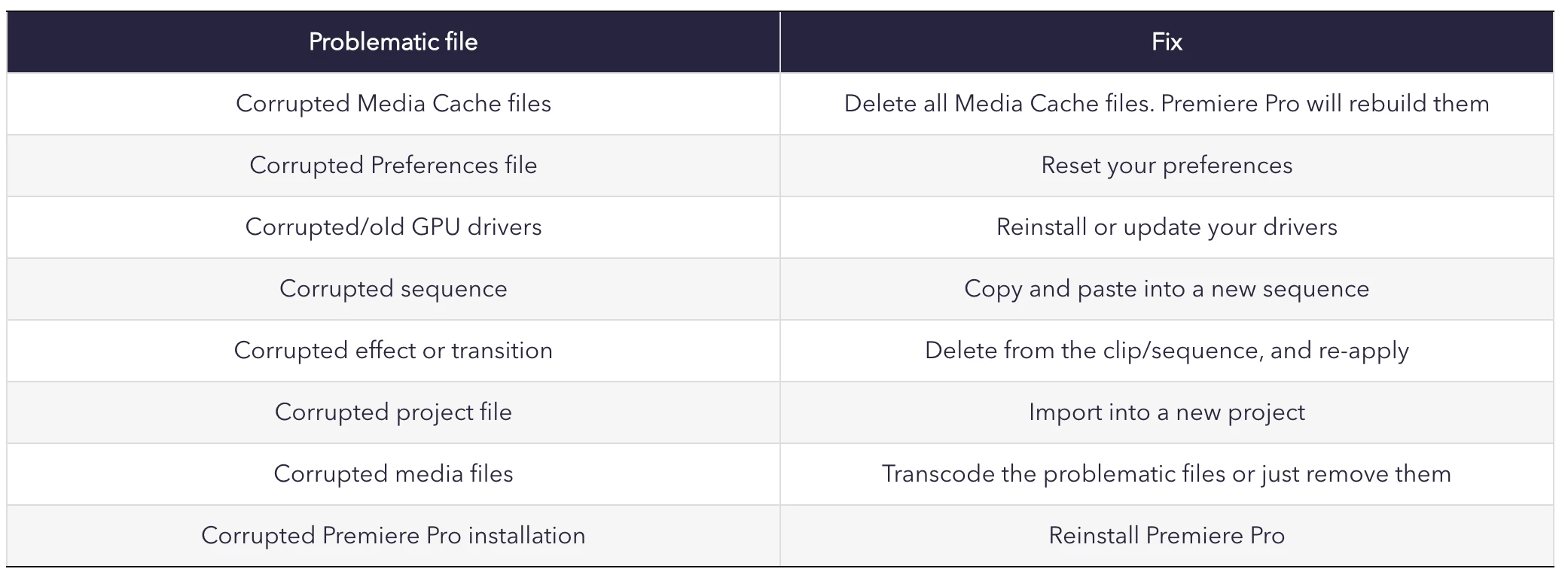


Let me know if it helps you.


Thanks,
Kevin

9 replies

Participating Frequently
July 30, 2025

If Premiere Pro crashes, lags, or shows errors, start by updating the software and your GPU drivers. Clear cache files via Preferences > Media Cache. Disable third-party plugins to rule out conflicts. Use Software Only rendering under Project Settings if hardware acceleration causes issues. For playback problems, lower the resolution or use proxies. Reset preferences (hold Alt while launching) as a last resort. Always keep your system and Premiere Pro up to date for best performance.

dion43
Participating Frequently
May 31, 2025

I never had issues with 2024, but 2025 is a mess. Any articles about that?

Community Manager
June 2, 2025

Hi dion43, 


Sorry about the poor experience. Please elaborate the issue you are experiencing with Premiere Pro. We're here to help, just need more info.


Thanks,

Sumeet

Participant
June 2, 2025
Hello,

After an update I was unable to use Premier. All the videos will show black (audio will play) but no frames. I had to downgrade to an older version to be able to use the application. I tried everything I could find in forums and or Youtube but nothing worked. As of now I am like 3 versions behind.

Thanks for reaching out.

[cid:pre-tec0-91-34-38logo-54_87be0cd4-13a6-4a02-bce5-6d5126b84bf1.png] Diego Ramirez
AutoPatch Proj Execution/Optimization Mgr
PRE-TEC, a division of
The Willamette Valley Company
Eugene, OR
541-606-5036 Cell
[cid:pretec-linkblue_8703b071-d6f8-47a3-930c-b45fd7dab9b6.png]<>
Participant
April 13, 2025

After an update, video previews/ playback will not show (black Screen) audio plays. I've tried reinstalling GPU drivers (Game & Studio), Deleting cache, and Uninstalling and Re-Installing Adobe Cloud and Premier. The only thing that "works" using the "Use Software Rendering only (one time only)" option.  It takes forever to export but it's the only workaround I could find.  It used to work just fine before the most recent update. Any pointers?

Community Manager
April 29, 2025

Hi there,


We're sorry to hear about this. Are you still experiencing this issue? If so, please let us know the version of Premiere Pro that you are using & about the GPU and its driver version.


Thanks,

Sumeet

Participant
September 11, 2024

PP 24.6.1 Build 2 not transcribing dialogue - I was getting the watermark transcribed in the music track but it wasn't seeing the dialogue. After some searching realised it was due to mxf clips so the work around is to export and import a wav file with the audio which it saw and transcribed straight away.

bb7775264
Participant
October 24, 2023

Can I revert to previous version? 24 is broken.

Participant
November 21, 2023

I got the same issue. Donwloaded version 24.03 and it doesn`t work. Now, the other versions arent working too, even the system requirements are given. help!

Remote Index
Inspiring
April 22, 2023

Kevin,


One caveat needs to be added. One of his "fixes" relies on using the Interpret Footage command. Using this command is not supported by Adobe if you're using a proxy workflow, and he should mention this when he suggests it.


Come to think of it, he should probably mention the proxy workflow limitations in his list of things to check. (ie. if you have used Modify Audio Channels/Timecode/Captions or  Interpret Footage and you are using a proxy workflow, it could be the source of problems.)


R.

Participating Frequently
August 31, 2023

The solutions can only be attempted after the problem is diagnosed. Most users don't know anything is corrupt, they simply have a number of lag issues, crashes, spinning ball and the like... This may as well be un-pinned. I wasted time coming here thinking this would help me and I'm sure others are lead here by the misleading title.

Warren Heaton10841144
Community Expert
Community Expert
February 9, 2024

Even if everything in Premiere Pro is working as expected, this is a good read for new and experienced users to be informed about the many files that allow the software to function as expected and have a quick reference to refer back to later. 


With the list of files right at the start of the article, users can decide to read the whole thing or jump right to a corresponding section for detailed instructions.


Remote Index
Inspiring
April 22, 2023

@Kevin-Monahan 


Thanks, Kevin,

I'm interested to know how Adobe is approaching solutions to these "common problems". For example, are there plans to automate each those "fixes".

Edit: I see he mentions a beta feature which addresses 'reset app preferences' in his post, but I'm wondering about the whole list.


R.


Averdahl
Community Expert
Community Expert
November 17, 2022

This post should be pinned. 🙂

Kevin-Monahan
Community Manager
Community Manager
November 17, 2022

Good idea. I'll do it. I also added a link to it in the main troubleshooting doc at the very top.


Kevin

Kevin Monahan - Sr. Community &amp; Engagement Strategist – Pro Video and Audio
Kevin-Monahan
Community Manager
Community Manager
November 17, 2022