Participant
October 5, 2020
Answered

FAQ: What's the difference between a Project and a Sequence?

  • October 5, 2020
  • 3 replies
  • 8742 views

Hi, I've never used premiere pro before and I am having to for a class.

My prof has instructed us to open up a new project, name it, then when it opens, to go up to the Sequence and choose Sequence > Sequence Settings. When I click on the Sequence menu, everything in the drop down, including sequence settings, is light gray and won't let me click on it to open it.

I just downloaded it, opened it up for the first time, and followed her instructions for creating the new project. It is literally step 2 and I am very confused. 
Correct answer Phillip Harvey

There may be some confusion between what a Project is and what a Sequence is (potentially from your Professor), or they've simply left out a step or two.

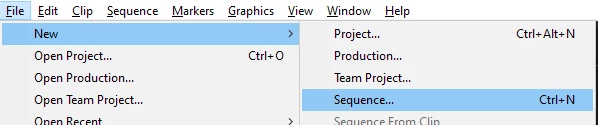
If you create a new project, you won't even have a sequence until you create one. That's why Sequence Settings is greyed out. You don't have a Sequence yet. You can go to File>New>Sequence to create your sequence.

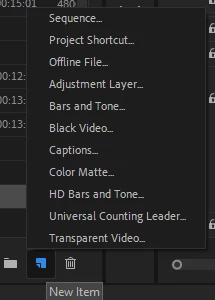
OR click the New Item icon in the lower right of the Project Panel:

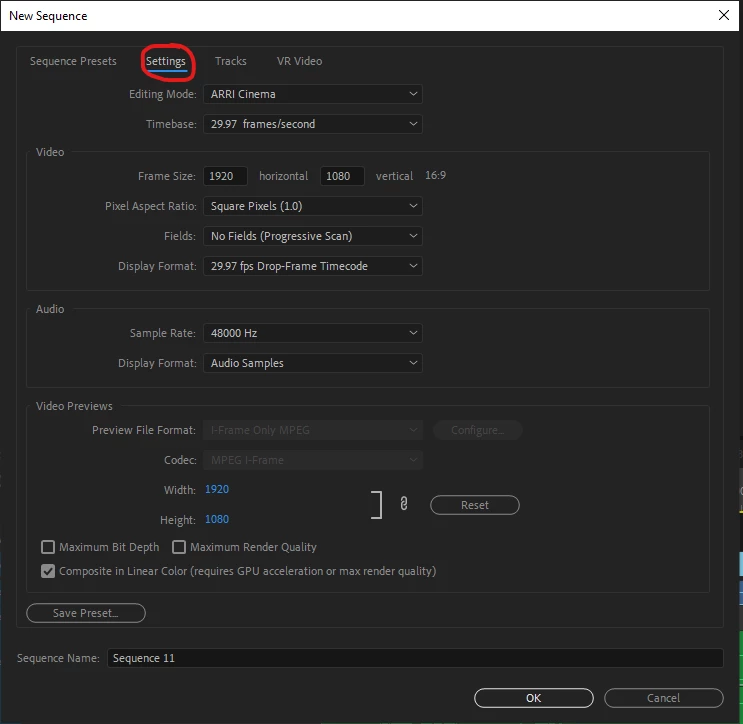
It'll ask you to start it based on a preset. You can essentially select anything you want, or choose one that seems close to what you are about to set up. Once you choose a Preset you can go to the Settings Tab where you can enter in whatever the settings were going to be that you were supposed to enter into Sequence Settings, which I'm assuming were provided.

Click Ok and your sequence will be created. You shouldn't need to go into Sequence Settings at this point (since you just set it up based on those settings.)

3 replies

Participant
April 19, 2021

A project contains all your assets for your editing project including sequences. A sequence is where you edit your video within the project. Not uncommon for me to copy sequences for revisions, or different versions of my original edit piece.

Participant
April 19, 2021

When setting up your project, its important to select where your different types of files will go, such as preview files and auto-saves. As the most important part of video editing is having an organized system in place where all your assets are stored and organized. There's no one correct way. Different people do it differently based on the style of the project, their computer/server setup, or if they work with other editors.

R Neil Haugen
Legend
October 5, 2020

To me, odd instructions perhaps.


When you create a project, typically the first thing you do is import media ... which doesn't move or copy anything, it just internally links that Prmiere project to the media on-disc.


After you have some media, you create a sequence either for or more often from that media. Just drag/drop a clip onto the timeline panel, and Premiere creates a seqeunce with settings to match that clip.


Without any media, without any sequences already in the project, yes ... that would be grayed-out.


Neil

Everyone's mileage always varies ...
sophosheAuthor
Participant
October 6, 2020

Yes my professor might've uploaded the instructions in the wrong order, uploading media before was very helpful. Thank you!

Community Expert
October 6, 2020

Yep, as Neil said, usually the best plan of action is to create a sequence based on the source media. There would be no need to visit Sequence Settings at all.

Phillip HarveyCommunity ExpertCorrect answer
Community Expert
October 5, 2020

There may be some confusion between what a Project is and what a Sequence is (potentially from your Professor), or they've simply left out a step or two.

If you create a new project, you won't even have a sequence until you create one. That's why Sequence Settings is greyed out. You don't have a Sequence yet. You can go to File>New>Sequence to create your sequence.

OR click the New Item icon in the lower right of the Project Panel:

It'll ask you to start it based on a preset. You can essentially select anything you want, or choose one that seems close to what you are about to set up. Once you choose a Preset you can go to the Settings Tab where you can enter in whatever the settings were going to be that you were supposed to enter into Sequence Settings, which I'm assuming were provided.

Click Ok and your sequence will be created. You shouldn't need to go into Sequence Settings at this point (since you just set it up based on those settings.)

sophosheAuthor
Participant
October 6, 2020

Thank you! Yes I think my professor accidentally left out a couple steps but making a new sequence first was very helpful.