


Participant
October 20, 2026
Question

Feather mask softening sequence edges

There seems to be a bug in Prem where when I apply a mask on opacity, and feather the edges, it decides to also feather the sequence boundary. This should not be the implementation. The mask boundary should be the only edges that are feathered. Is there a setting to fix this?

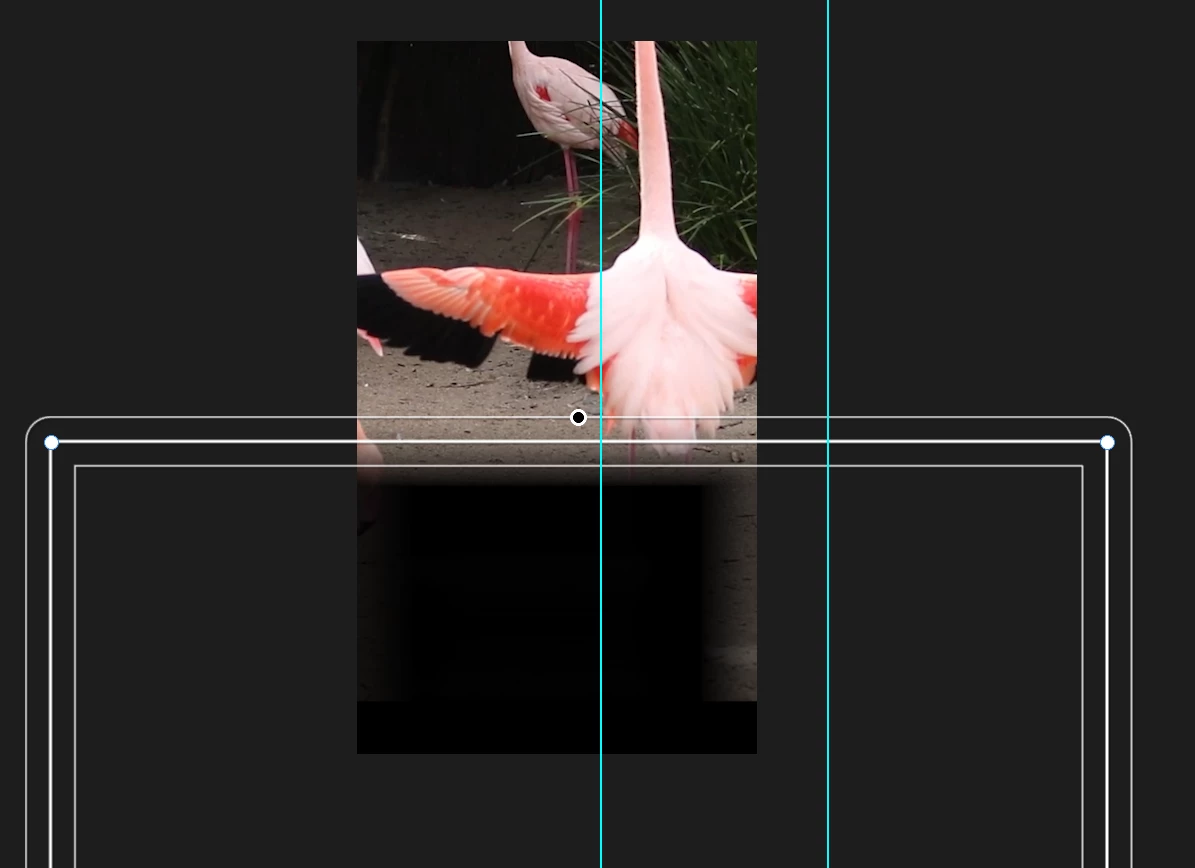
In the attached screenshot, I what the feather on the upper edge of the mask only, not the left and right sides of the composition/sequence bounds.
 

    3 replies

    CORCTON34033231
    Community Expert
    Community Expert
    October 21, 2026

    Hi! There isn't a per-edge feather setting — Mask Feather is a single value that softens all edges of the mask (Effect Controls > Opacity > Mask Feather), as Adobe's guide describes it: https://helpx.adobe.com/premiere/desktop/add-video-effects/work-with-masks/adjust-mask-properties.html


    The usual workaround for your case: zoom the Program Monitor out (e.g. to 25%) and drag the mask's left and right points well beyond the sequence frame — further out than the feather amount. The side feathering then happens outside the visible frame, while the top edge inside the frame keeps its soft edge. Drag the bottom points below the frame too if you don't want that edge feathered either.


    Hope that does it!

    Translate
    armtimAuthor
    Participant
    October 21, 2026

    Hey, are you able to see the screenshot? The mask is dragged out way beyond the frame, and yet the edge of the frame is feathered. The way you are describing the fix makes me think this is indeed a bug. 
    Can you confirm that from the screenshot? I would make me more confident if you can recreate what Ive done and show me your screenshot to compare.
    Thanks!

    Translate
    CORCTON34033231
    Community Expert
    Community Expert
    October 21, 2026

    Yes — I can see your screenshot clearly, and you're right: your mask points are already dragged well beyond the frame on the left and right, and yet the edges of the frame are still feathered. So my "drag them further out" tip doesn't fix your case — sorry about that.


    Why it happens: the feather is applied to the mask's alpha inside the clip's own frame. Where the mask runs off the frame, the alpha is simply cut off at the frame edge, and the feather softens that cut-off too — so the side feathering follows the frame boundary no matter how far out the points sit. I can't recreate your exact project from here to post a comparison screenshot, but your screenshot shows precisely that behaviour.


    For a feather on the top edge only, the reliable route in Premiere is the Linear Wipe effect instead of a mask:

    1. Apply Effects > Video Effects > Transition > Linear Wipe to the clip.

    2. Set Wipe Angle so the wipe runs vertically — try 90°/270° and pick the one that eats into the clip from the top; you'll see it straight away in the Program Monitor.

    3. Use Transition Completion to position the edge, and Feather to soften it.

    The feather then exists only along that one straight edge — no mask, and no frame-edge side effect.


    And if you'd like the mask behaviour itself looked at as a bug, it's worth also posting it under Bug Reports in this community so the team can log it.

    Translate