
Answered
File Import Failure
When I tried to import an audio folder, I got an error message. How to fix it.
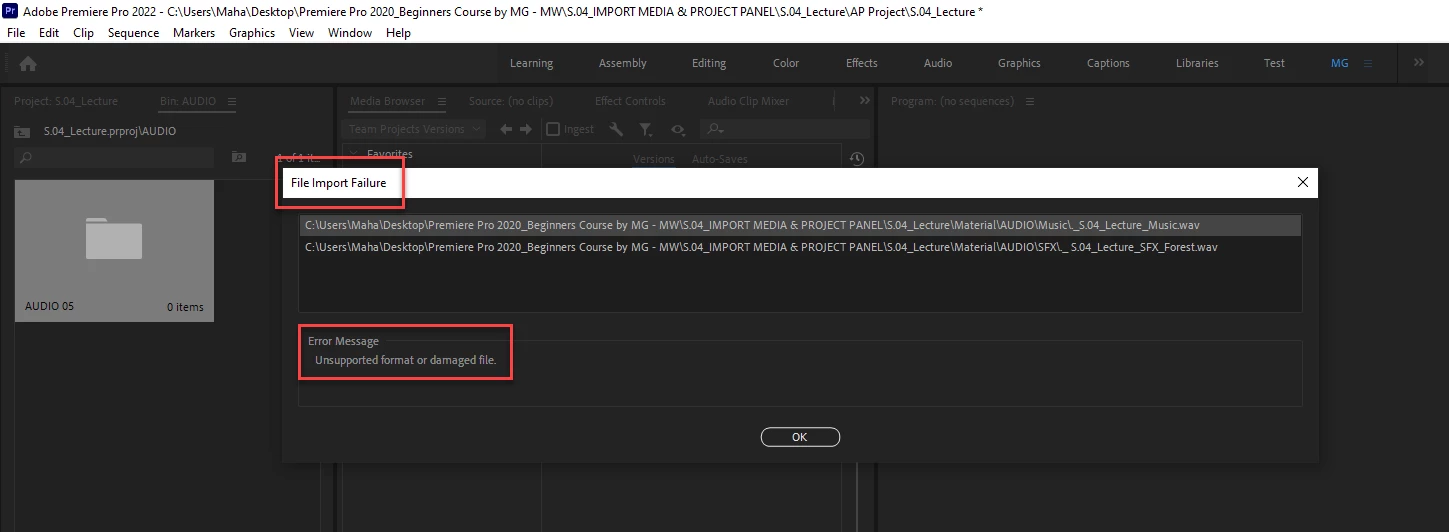
There are only two folders in the audio folder. In each folder, there is a single file. Screenshot is attached.


When I tried to import an audio folder, I got an error message. How to fix it.
There are only two folders in the audio folder. In each folder, there is a single file. Screenshot is attached.
Is it possible to fix this error? I am following a tutorial done in Mac but the problem is in the Q&A section of the tutorial no one has this issue. Therefore I assume this problem is with my computer.
Is it possible to fix this error? I am following a tutorial done in Mac but the problem is in the Q&A section of the tutorial no one has this issue. Therefore I assume this problem is with my computer.
By @MahaB82A
Contact the one that created the tutorial. 🙂
Premiere Pro import supported files and throw an error on all non-supported files. Since the .zip file is full of unsupported files you will get an error. In the file i downloaded there are more unsupported files than supported files, hence the recommendation to contact the one that created the tutorial.
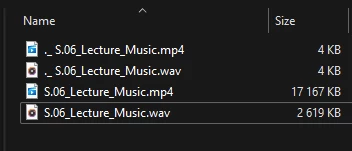
However, Mac computers always injects zip archives with unsupported files such as .DS_Store, ._.DS_Store and tons of files starting with a period, such as ._ S.06_Lecture_Music.wav. The folder __MACOSX in the zip file should just be ignored since it contains only non-supported files. If i get a zip file from a mac i always delete that folder since it´s unusable on a Windows machine. All this is due to how the Mac file system works.
Files starting with a period (.) are all unsupported files and will give you an error that just can be dismissed.
Since the supported material imports fine i would just ignore the error message.
This is how Premiere Pro works today for everyone so there is not an issue with your computer. I don´t know if the Mac version of Premiere Pro is smarter than the Windows version and by default ignore those files. That may explain why others don´t get those error messages, or that unpacked zip files on the Mac only contains the supported files.
If you import using the File > Import you can see the size of the files to see better what files to import. The 4 KB files are the ones that gives errors and can just be ignored. (They all start with a period as well, (.).)
Already have an account? Login
Enter your E-mail address. We'll send you an e-mail with instructions to reset your password.

 AdChoices