
VZNRY
Participant
April 8, 2017
Question

File Import Failure

  • April 8, 2017
  • 8 replies
  • 32477 views

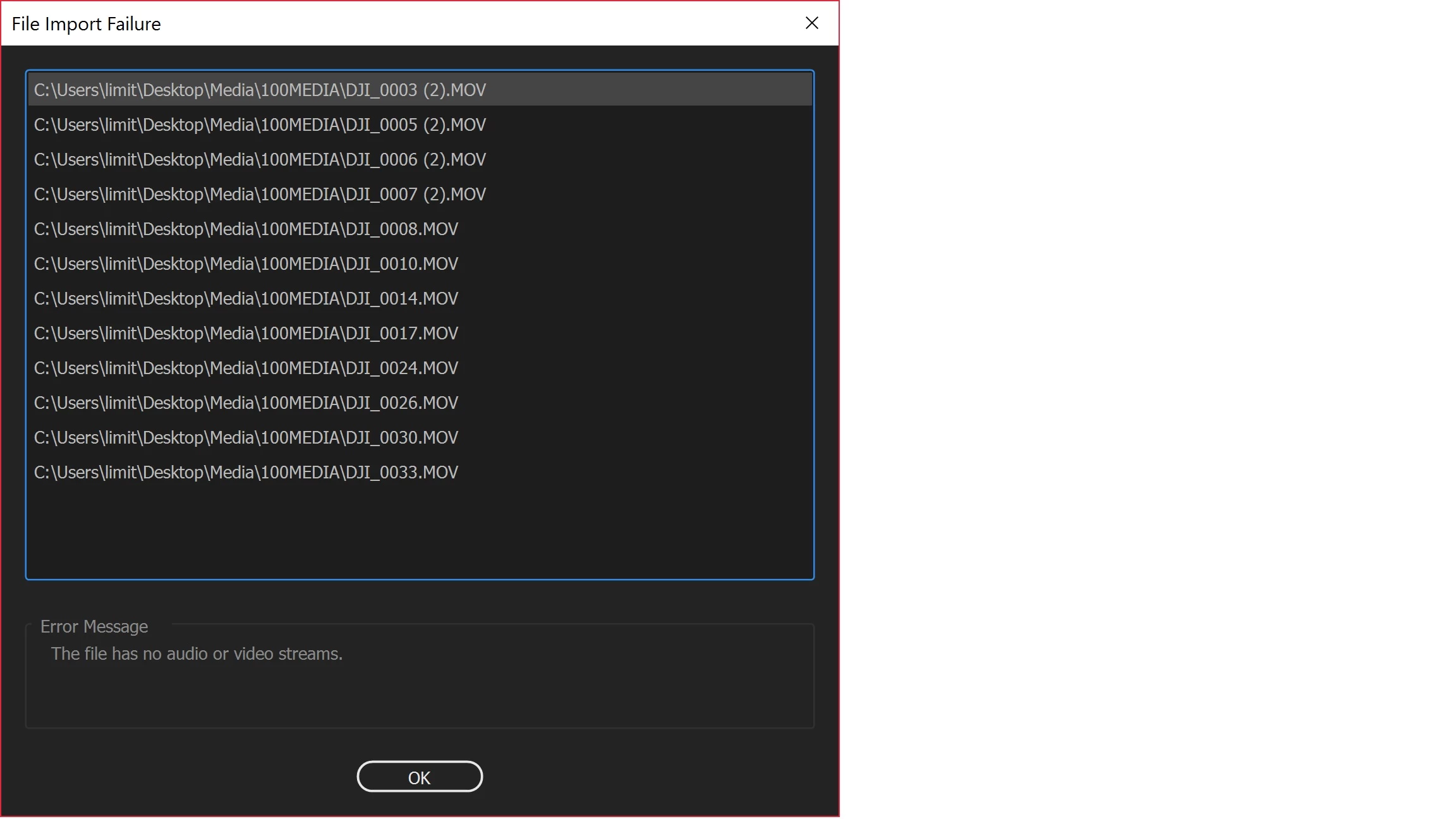
I am trying to import 40 or so clips shot all from the same day of 4k drone footage. For some reason 30 or so get imported and the rest show up with this error. When I go to play the same file from windows media player it plays perfectly fine. I am using the most up to date premier pro cc 2017 and uninstalling then re trying does nothing.
This topic has been closed for replies.

8 replies

Known Participant
September 20, 2019

Install Microsoft Media Feature Pack, it solved my files  importing problem.

https://www.microsoft.com/en-us/software-download/mediafeaturepack

richardd75326250
Participating Frequently
August 21, 2018

Right, so what I did in the video setting today, was change from mov to mp4 in my p4 pro +.  10 out of 10 clips imported via media browser successful.

I'm myth'd still why PP will import some Mov files and not another. I've looked at two clips with identical properties and one will import while the other will not.

richardd75326250
Participating Frequently
August 20, 2018

Yes, I'm in the same situation. Tried everything. Why is this such a common problem?

I get the message  "A low-level exception occurred in: ImporterMPEG (Importer;39) when uploading from the media browser.

All 3 footage projects have the same issue. Few will import, most will not.

I will try playing with the settings in the p4 pro. Saw a  YouTube video and report back.

Honestly though, why should I pay a subscription for Adobe PP and have these issues.

I have had this for 2 weeks now. Close to giving up on PP and ask for a refund. That's if they will oblige.

juanmario
Participating Frequently
August 20, 2018

I recommend you try this

Go to Edit> Preferences> Media and remove the checkbox before the item: enable Intel h.264 decoding (requires restart), or (12.1.2) Enable hardware accelerated decoding.

richardd75326250
Participating Frequently
August 21, 2018

Hi Juan

Thanks for the advice.

It was partially successful. 23 out of 28 imported. Before 4 of 28.

Hmmm, wonder why those 5 are unsuccessful?

Participant
May 10, 2018

I too had the same error message.  I tried to rename the files and it didn't help with linking the media.

What did help was erasing the file completely from my project (it was saved in the project within a slide I created) and also from my H Drive?  I will then import the file back in directly to the project to try to use the file.  

Participant
August 10, 2018

I downloaded the free version of Filmora and could import the files Premiere Pro CS5 could not.  I edited them easily and exported.  Premiere imported 1 of 3, I edited it (painstakingly) and exported, it had jumpy parts, green, etc. not usable at all.   I am using an ASUS laptop with i7 processor, 16gb ram, 64 bit.  Not sure why program works and CS5 doesn't.

EvGriff42
Participant
August 30, 2017

Having the same issue with Premiere Pro CC 2017. In my case it's a 10GB few hour long file in 1080p in MOV format. I'm converting to MP4 and renamed completely to see if this will resolve the problem.

EvGriff42
Participant
August 31, 2017

Following up to confirm that a file format change from MOV did work in my case, even thought most of my camera's files are MOV and function without a problem.

Easy_162
Participant
July 27, 2017

What solved the issue for me was copying the file that wouldn't import, and renaming it to something slightly different.

For example: DJI_0019 renamed to DJI_0019_1.

I was then able to import without issue, and edit the file as normal.

Hope this helps someone.

DDV499
Participant
April 26, 2018

I'm not sure why renaming the file fixed the problem completely but it did. Thank you!!

Inspiring
May 5, 2017

Hello,

I'm having the same issue uploading 4k footage from my Phantom P4P+ drone... Was able to move one file over - getting error msg "File has no Audio or Video streams" on all the other files. 

Help!

Best,

Marty

Inspiring
May 5, 2017

Tried step 2h above and still not working.  Tried building a new project saving to a new drive and still getting the same error.  Not able to work on these file in Premiere Pro.

Any assistance would be helpful.

Much thanks!

Marty

Ann Bens
Community Expert
Community Expert
May 5, 2017

Have you tried rename mov to mp4?

Legend
April 10, 2017

Couple thins I would recommend.

First, don't use the C: drive for anything but Widows and Programs.  Move the media to another internal hard drive dedicated to camera media only.

If that alone doesn't resolve the issue, report back.

VZNRY
VZNRYAuthor
Participant
April 11, 2017

Thank you for the response on some options! Unfortunately even when I put all the files onto my D: drive and then went about trying to import them into premier I got stuck with the same issue. Only some of my files imported and the rest give me an import error.

Legend
April 11, 2017

OK.  Try step 2h to begin with.

Unofficial Premiere Pro Troubleshooting Guide