
File Management/backup questions
Hi, I recently happily switched from Avid MC to Adobe Pr and have questions about how Pr saves files and what I should back up, delete, or ignore. I recently completed two projects and figured out how to consolidate and archive them. I keep my raw media on an external drive that I back up to a cloud service and have a "PrProjects" folder in my iMac's Document folder for each project where I save assets, project versions, and Auto-save files that I also backup.
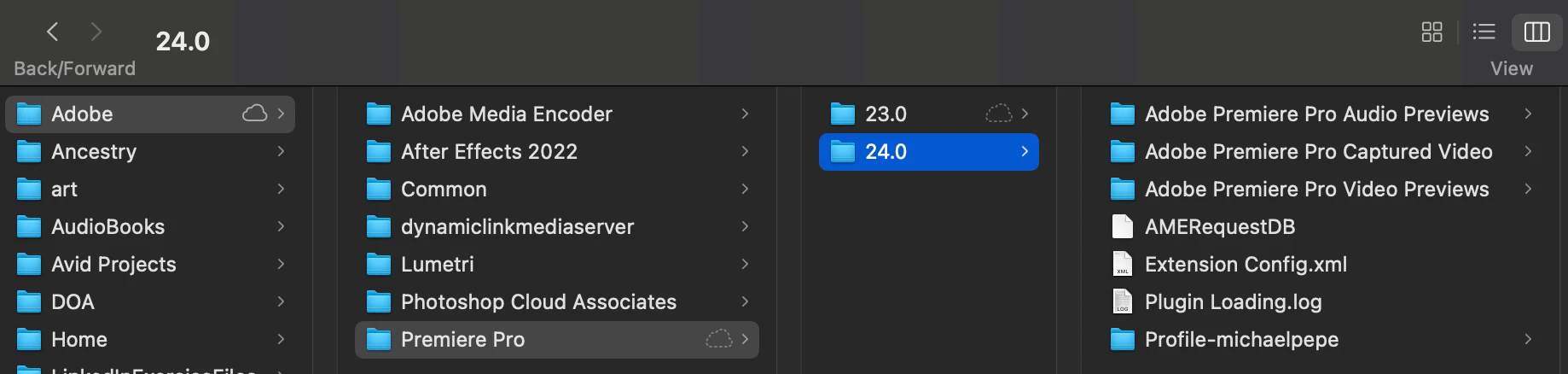
I'm confused about what's going on inside my Document/Adobe folder, which I did not create (screenshot below). Inside the "Premiere Pro" folder are two folders called "23.0" and "24.0," representing the original and upgraded versions of Pr (very annoying). I can see that this folder will get very large over time. Once I finish editing a project, is it safe to delete these folders? Can I safely delete the folder for the previous version? Do I have to move files? What is the purpose of the Documents/Adobe folder where there are also subfolders for AE, ME, and other Adobe products? Thank you.
 AdChoices