Participant
May 9, 2023
Question

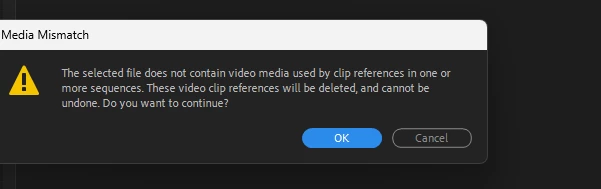
File will not Link
  • May 9, 2023
  • 2 replies
  • 719 views

I rendered my project ready to export and when it was exported it had a black and green square in the clip for one of the camera angles. I then went back in to try and remedy the problem. Now the file will not relink. I have placed the file in a new folder. I tried to delete the rendered files, however as I had reopned and closed the project this was not possible. I have opened pre-saved versions to see if an non corrupt version exists but in every version the file will not link. Any advice is welcomed. My Premiere Pro is running the lastest version. 

This topic has been closed for replies.

2 replies

Legend
May 10, 2023

iphone footage is variable frame rate (vfr) which Premiere has had intermittent and unpredictable problems with.  Here's how to diagnose and fix the issue


use mediainfo to determine whether your source is variable or constant frame rate
https://mediaarea.net/en/MediaInfo/Download
if it's variable use handbrake to convert to constant frame rate setting the quality slider in the video panel to maximum
https://handbrake.fr
and here's a tutorial on how to use handbrake
https://www.youtube.com/watch?time_continue=34&v=xlvxgVREX-Y


Once you've converted the footage, you should be able to make it offline and relink to the constant frame rate footage.  

Peru Bob
Community Expert
Community Expert
May 9, 2023

Was the file extension of the media changed?

Participant
May 9, 2023

It is a .MOV file and has not been changed since it was uploaded. It was filmed on an iphone and transfered to my PC via a usb cable. I created a seperate folder for the media in there and then renamed the files to camera 1 and camera 2 in premeire pro, as it has been edited in multicam. 

Peru Bob
Community Expert
Community Expert
May 9, 2023

Try copying the files to the computer again.