Inspiring
February 25, 2017
Answered

Filter Bin Content bug

  • February 25, 2017
  • 4 replies
  • 2182 views

For as long as I can remember, Premiere has always returned irrelevant results when I enter a search term into the 'Filter Bin Content' field.

I then have to browse through multiple clips to find the one I want.

See the example below.
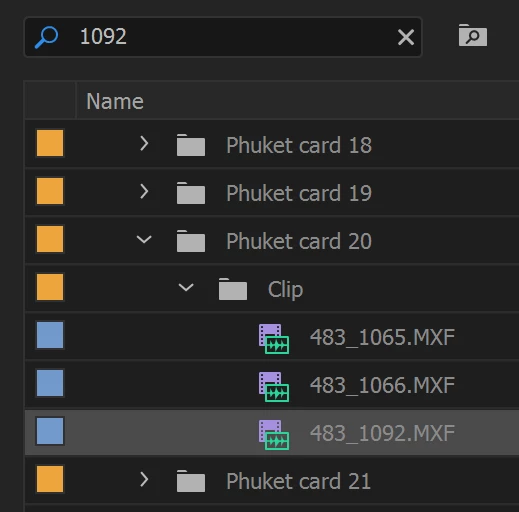
Can anyone think of a valid reason why I would get multiple results, when clearly only one of them contains the text that I entered?

Insights appreciated.

Cheers.

Gary

.

Correct answer excited_Genie16B8

The data may be contained elsewhere besides the name.

4 replies

lflegg
Inspiring
January 19, 2019

Hi all.

When seeking multiple search results (rather than one specific file)

I would solve this problem by creating a new Search Bin (File > New > Search Bin)

Specify Filename: 1092

This will populate the Search Bin with all files in the project which match that

Miura_vs
Participating Frequently
July 27, 2017

Having a similar issue.  I spent many hours labeling footage in the "description" column.  Now, even when staring right a clip labeled "INSERT, water," Premiere doesn't pull up anything when I hit command+F, and search for "water," in the description column.  I'm not impressed with this software.  It's caused me nothing but problems.

excited_Genie16B8Correct answer
Legend
February 25, 2017

The data may be contained elsewhere besides the name.

Inspiring
February 26, 2017

Thanks Jim.

You prompted me to look further and there it is, in the audio timecode values, which show samples rather than frames.

It would be good if the filter could ignore audio samples, as I doubt anyone would be searching for those.

Cheers.

Gary

.

Legend
February 26, 2017

The day after Adobe changes the software, someone will come here asking why PP isn't finding their files.

Ann Bens
Community Expert
Community Expert
February 25, 2017

It sometimes does weird things:

Feature Request/Bug Report Form