Participant
January 24, 2024
Answered

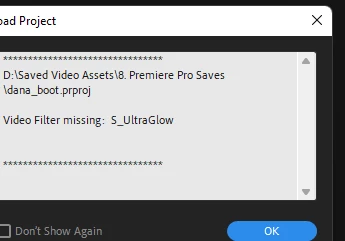
Filter Offline "S_UltraGlow"

  • January 24, 2024
  • 3 replies
  • 835 views

Hello, my Premiere Pro has been "Filtering Offline" S_UltraGlow (Sapphire) for the past day and I need this plugin. I have absolutely no idea. I reinstalled Premiere Pro. I reinstalled Sapphire. I reinstalled both twice. It still kept the filter offline, however, After Effects this problem does not even appear. 

 

This topic has been closed for replies.
Correct answer Warren Heaton

The Sapphire effects install and activate via an application similar to how how Premiere Pro installs and activates through Adobe Creative Cloud Desktop.


Look for BorisFX Application Manager in our Programs folder.

If you cannot get it installed on your own, reach out to BorisFX at https://support.borisfx.com/hc/en-us.


3 replies

Bruce Bullis
Community Manager
Community Manager
January 24, 2024

Warren's directions are correct.


Warren Heaton
Community Expert
Warren HeatonCommunity ExpertCorrect answer
Community Expert
January 24, 2024

The Sapphire effects install and activate via an application similar to how how Premiere Pro installs and activates through Adobe Creative Cloud Desktop.


Look for BorisFX Application Manager in our Programs folder.

If you cannot get it installed on your own, reach out to BorisFX at https://support.borisfx.com/hc/en-us.


Participant
January 24, 2024

PS. My other Sapphire plugins, effects are active and I can use them. This is the only one that I can't use and the only one I USED. Something happened and I think I was trying to download the Logarith Codec Loseless Thing. So, this is the only thing That I am not able to use. I would appreciate it if someone can help me. Can provide screen recordings.