

DaveChap
Known Participant
October 25, 2023
解決済み

Fix Transcript Partial Sentence Breaks

  • October 25, 2023
  • 返信数 1.
  • 669 ビュー

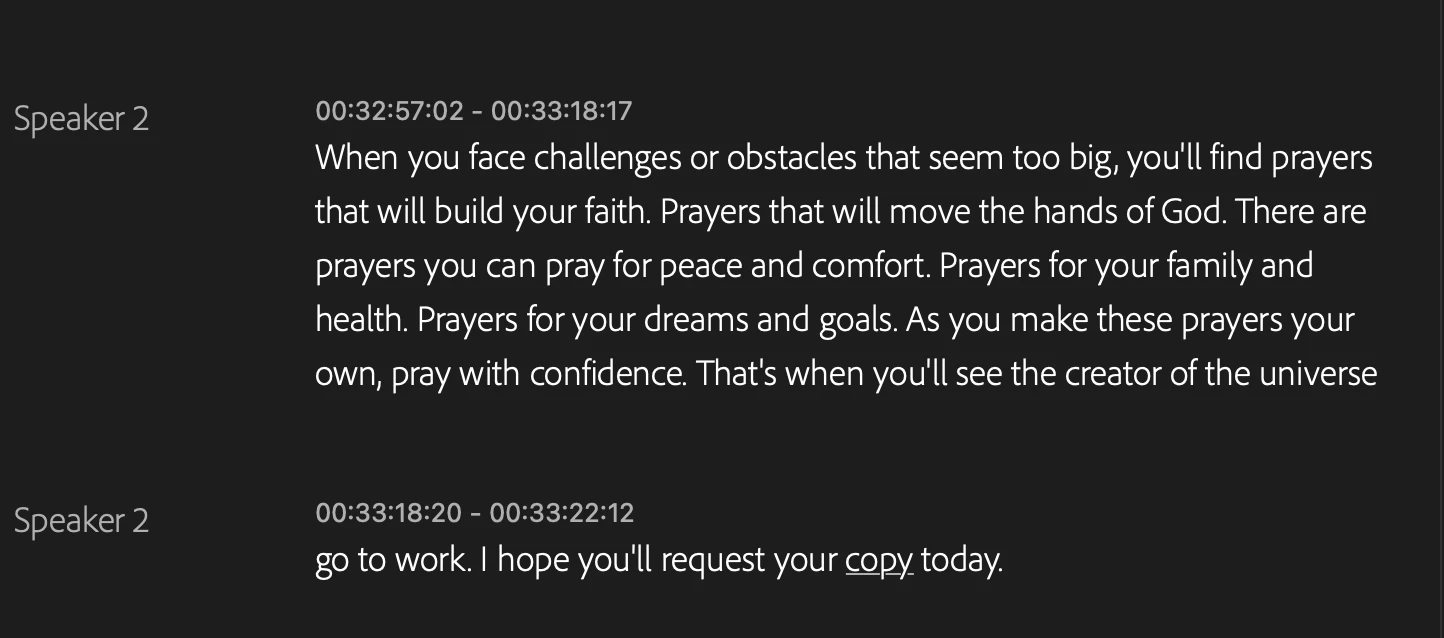
I'm not finding a way to fix sentence breaks where Premiere has decided something shuold be in a new paragraph, even though it's part of the previous. Is there not a way to merge a sentence with the previous paragraph? I hate when a sentence is broken out like this...


Initually there was a period and the new line started with a capital letter, but I removed the period and lower cased the next word. But there doesn't seem to be a way to merge it back to the paragraph above.
 

このトピックへの返信は締め切られました。
解決に役立った回答 Kevin J. Monahan Jr.

Hi @DaveChap,

Try this: Select the captions and click the Merge Captions button at the top of the Text window. Does that work for you? Let us know.


Thanks,
Kevin

返信数 1

Kevin J. Monahan Jr.
Legend
October 25, 2023

Hi @DaveChap,

Try this: Select the captions and click the Merge Captions button at the top of the Text window. Does that work for you? Let us know.


Thanks,
Kevin

Kevin Monahan - Sr. Community and Engagement Strategist – Adobe Pro Video and Audio
DaveChap
DaveChap作成者
Known Participant
October 25, 2023

Thanks! That was it. I had to go to the source tab at the bottom left instead of the sequence tab for the transcript.

Kevin J. Monahan Jr.
Legend
October 25, 2023

Cool. Glad to hear it @DaveChap!


Kevin

Kevin Monahan - Sr. Community and Engagement Strategist – Adobe Pro Video and Audio