


rob-mcp
Inspiring
July 8, 2026
Answered

Following an online course, says Export Video and Audio, do NOT see those checkboxes

  • July 8, 2026
  • 4 replies
  • 26 views

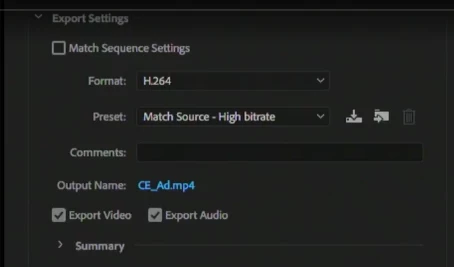
I am doing a course part of it specifies (after creating your video clip) CTRL + M to export, the video clearly shows Video and Audio checkboxes, which you select to export both, when I process the clip as MP4 it does NOT play the audio channel.

Can anyone say where I can find/turn on the shown checkboxes?
 

    Correct answer rob-mcp

    I cannot tell you what the issue is, it’s TOO EMBARASSING!

    (Said in a whisper) When I exported the media, I had not noticed that I had, on the audio track in PremPro, a little green button set, the one with an M on it. (Mute) Pleeese don’t tell anyone.

    Thank you for the checkbox location answer.


    4 replies

    rob-mcp
    rob-mcpAuthorCorrect answer
    Inspiring
    July 8, 2026

    I cannot tell you what the issue is, it’s TOO EMBARASSING!

    (Said in a whisper) When I exported the media, I had not noticed that I had, on the audio track in PremPro, a little green button set, the one with an M on it. (Mute) Pleeese don’t tell anyone.

    Thank you for the checkbox location answer.


    Ann Bens
    Community Expert
    Community Expert
    July 8, 2026

    Think of this: You are not the first and won't be the last.

    rob-mcp
    rob-mcpAuthor
    Inspiring
    July 9, 2026


    Thank you Ann, as always you are too kind!

    rob-mcp
    rob-mcpAuthor
    Inspiring
    July 8, 2026

    Dang! You’re good.

    Thank you, I have made a note of that option, I am always careful when completing training courses, as the trainer invariably has different Versions to me, but I struggled in finding that one.

    HOWEVER! I just reran my test created video, VLC player has no sound! So thanks for the help, very useful for future ref but I still have an issue. Cheers. If I sort it I will post to this query.

    Ann Bens
    Community Expert
    Community Expert
    July 8, 2026

    Please state the version you are using!!

    Ann Bens
    Community Expert
    Community Expert
    July 8, 2026

    Which version of Premiere are you using: state version and build. See About Premiere under Help.

    Does your online course match your Premiere version.

    Screenshot is of an older version.

    rob-mcp
    rob-mcpAuthor
    Inspiring
    July 8, 2026

    Prem Pro 2024, sorry Ann, should have said.

    Averdahl
    Community Expert
    Community Expert
    July 8, 2026

    You will find it if you use the Send to Media Encoder button. This will launch Adobe Media Encoder, and there is it.


    It was present directly inside Premiere Pro in older versions.


    rob-mcp
    rob-mcpAuthor
    Inspiring
    July 8, 2026

    Thanks, but despite clicking the Send to Media encoder, I still don’t seem to be able to find what you screenshot.

    Averdahl
    Community Expert
    Community Expert
    July 8, 2026

    Click on either one of the blue links to the left, such as H.264 and Match Source - Adaptive High Bitrate.