


Inspiring
August 14, 2025
Question

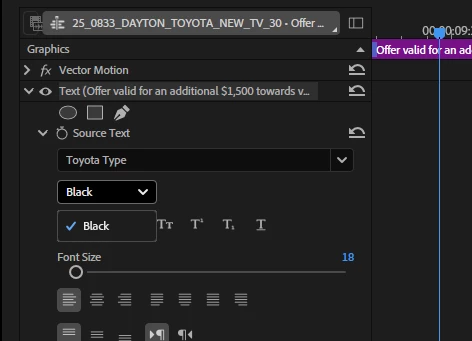
Font styles missing in Premiere

  • August 14, 2025
  • 1 reply
  • 231 views

Working on some stuff for Toyota and they have their own Toyota Type font. Works fine in After Effects and Photoshop, but in Premiere only the 'Black' style is available and the rest do not appear in the effect dropdown.

Any solutions?
 

1 reply

Community Manager
August 14, 2025

Hi @Swemba,

Thank you for reporting an issue. What version of Premiere Pro are you on?

Are any of the other font styles showing up separately from the main type in the drop-down menu or is that the only instance of the Toyota Font in the drop-down?

How was the font added? Have you tried to install it through the Creative Cloud Desktop app? (You can find more information on how to do that here: Upload your fonts to Creative Cloud)

Sorry for the frustration,
Dani