belenm53842651
Participant
June 6, 2023
Question

Fonts not showing correctly in Premiere Pro

  • June 6, 2023
  • 2 replies
  • 1101 views

Hello, 


I am currently using Adobe Premiere 2020 and i am experiencing an issue regarding fonts and how they are displayed in said programme. 


I need to use this font called Outfit, i have installed it in both, .otf and .ttf format files. When I try to use it, this is how it shows up on the programme: 
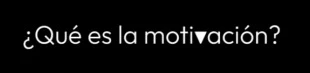
 

As you can see, the letters are not displayed in the correct way. When i try to use Outfit regular, the accents dont show, whereas when i try to use the black font weight, the letter V shows up as a triangle. 


Hope somebody can help me!


Thanks! 


This topic has been closed for replies.

2 replies

Richard van den Boogaard
Community Expert
Community Expert
June 24, 2023

Is it possible for you to update to the latest version of Premiere Pro? Why are you editing in 2020?

Kevin-Monahan
Community Manager
Community Manager
June 8, 2023

Hello @belenm53842651,
 I saw your note and see your issue. Thanks for the screenshot. Can you try a different font as a test? Some fonts can give you unexpected results. You may want to search for a similar font in Adobe Fonts. If you acquire the font from the original foundry (Smartsheet), you can have better results. See if that works better for you.


Thanks,
Kevin

Kevin Monahan - Sr. Community and Engagement Strategist – Adobe Pro Video and Audio