
Footage decided to zebra out of nothing during editing.
Hi!
If there is a thread with a solution, please let me know! Couldn't find a thread that was having the same issue.
I was spotting the footage for useful parts and after a while some older footage, that was imported yesterday decides to just poof and zebra the heck out of me. But not all footage. It is only the footage from one particular scene. The spotted footage is copied next to the footage and that is not zebra'd out. The rest is fine.
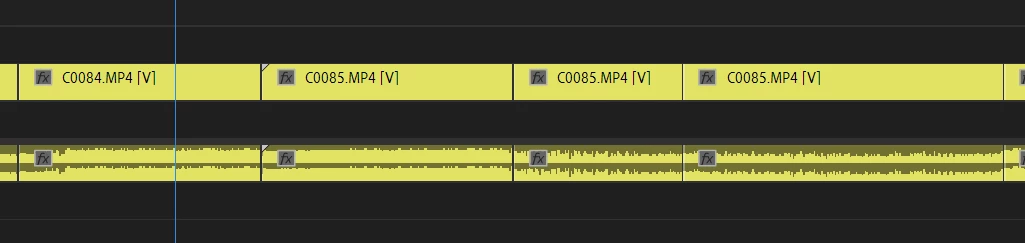
Check Photo 1 where I have C0084 partially cut out to use for my video. I copied the yellow part (BEFORE the zebra-issue happened) further down the timeline to have all the useful footage together. On Photo 2 the clip C0084.MP4 is not corrupt. The zebra'd footage, shows black on the program monitor. I tried a few things in advance:
When I right click > reveal in Explorer or Project it shows me the clip on both locations. The file on my pc shows the full duration when I open it in VLC, so it's not corrupt AFAIK.
I tried to relocate the files and re-link them but still the same zebra. I tried to rename a clip and Make it offline and re-link them but again without succes.
Photo 1
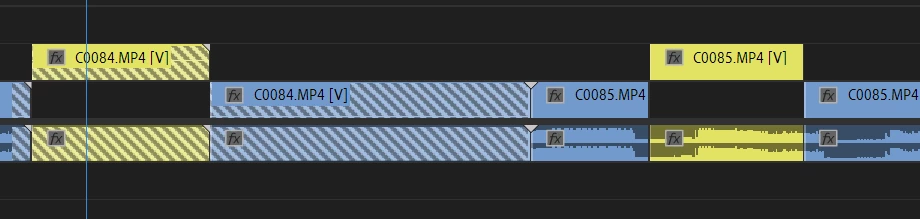
Photo 2
I updated PP to the latest version (14.6) after the problem occured in the hope it will fix it but again, without succes.
Anyone having experience with this? This is the first time this occured to me.
 AdChoices