tedj63142937
Participating Frequently
December 14, 2018
Answered

Footage looks low quality when imported

  • December 14, 2018
  • 3 replies
  • 783 views

I am new to Adobe and have looked at some of the tutorials, but cannot seem to find the answer to my concern.  I have GoPro video clips(mp4 files) that I am trying to stitch together, and am concerned.  When viewed as stand alone clips, outside of Adobe they are sharp.  When I import them and begin editing they are very pixelated.  I'm concerned that I am importing in the wrong format, or have a setting wrong.  Please help, and remember I am new to the software.  Thank you for your patience,

Ted
    This topic has been closed for replies.
    Correct answer Meg The Dog

    tedj63142937  wrote

    When I import them and begin editing they are very pixelated.

    How are you importing the files?

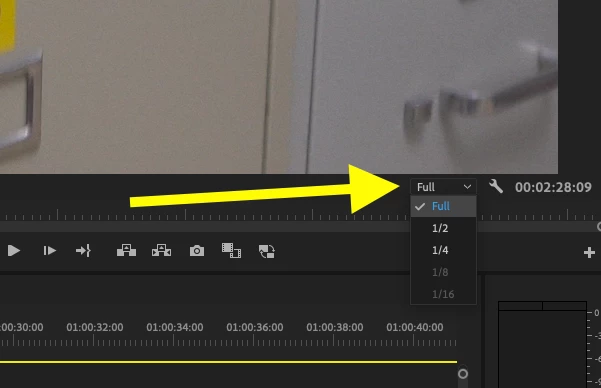
    In Premiere Pro, do they look bad on the Source monitor (the left hand monitor) and the Program monitor (the right hand monitor that shows the timeline contents)?

    Are those monitors set to display at full resolution, or partial resolution?

    Can you post a screen shot or your Sequence Settings (go to the menu Sequence > Sequence Settings)?

    MtD

    3 replies

    tedj63142937
    Participating Frequently
    December 14, 2018

    I'm using the add media in the upper left corner

    Inspiring
    December 14, 2018

    Is this Premiere Elements?

    That forum is located here:

    Premiere Elements

    You are posting in the Premiere Pro forum - different application.

    MtD

    tedj63142937
    Participating Frequently
    December 14, 2018

    sorry

    caroline_edits
    Community Manager
    Community Manager
    December 14, 2018

    Hey there, TedJ!

    Welcome to Adobe! We're happy to have you.

    I was going to ask the same thing as MtD!

    -Caroline

    tedj63142937
    Participating Frequently
    December 14, 2018

    Meg The DogCorrect answer
    Inspiring
    December 14, 2018

    tedj63142937  wrote

    When I import them and begin editing they are very pixelated.

    How are you importing the files?

    In Premiere Pro, do they look bad on the Source monitor (the left hand monitor) and the Program monitor (the right hand monitor that shows the timeline contents)?

    Are those monitors set to display at full resolution, or partial resolution?

    Can you post a screen shot or your Sequence Settings (go to the menu Sequence > Sequence Settings)?

    MtD