


frame.io V4 went well with Premiere 26.2.0 until today. Now there is an error-message "something went wrong"
Until yesterday I used frame.io V4 in Premiere 26.2.0 with no problem. Today opening the window frame.io in premiere there is a message “something went wrong”.
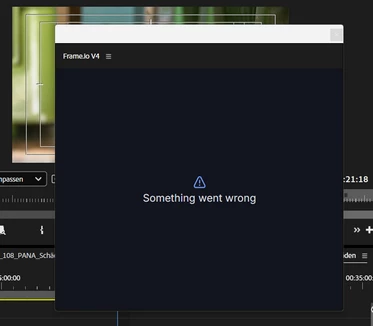
Even if I reload the window this message appears.
The Login in my frame.io V4 account via the Browser https://accounts.frame.io/welcome?legacy_auth=false&auth_callback=adobe%2Bppro://frameio works well: “Authentication complete. Please return to Premiere Pro.” But in premiere it doesn’t work (“something went wrong”).
Opening frame.io via the application-page in creative cloud let me work with my frame.io-account within the browser - but not with premiere (“something went wrong”). The same if I sign in at the frame.io-page.
I deleted all cache-files, most recently I reinstalled Premiere 26.2.0. No success.
Win11, no system-changes since yesterday… No problem with internet-connection.
Thanks for help!
Oh, sorry, it seems I am in the wrong community chapter (bugs) - it is a question...
… I try it there..
 AdChoices