Frame "split" glitch only after export
Seemingly every other time I export a version of this video, there is one single frame at some point throughout that "splits" as seen below. It does NOT appear when watching a rendered preview in Premiere (CC 2015.4, just upgraded). Only after rendering. Very frustrating. Any idea why this is and how I can avoid it on export? First time posting, so please let me know if you want further details. I provided a bunch below. Thank you!

Computer specs:
Late 2013 iMac 27"
3.5GHz quad-core Intel Core i7 processor
8GB Memory
1TB storage
NVIDIA GeForce GTX 775M graphics processor with 2GB of GDDR5 memory
Footage specs:
Type: MPEG Movie
File Size: 3.97 GB
Image Size: 1920 x 1080
Frame Rate: 23.976
Source Audio Format: 48000 Hz - 16 bit - Stereo
Project Audio Format: 48000 Hz - 32 bit floating point - Stereo
Total Duration: 00:06:25:00
Pixel Aspect Ratio: 1.0
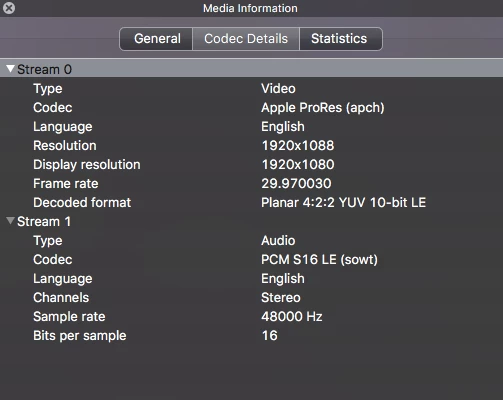
Export specs:
Type: QuickTime Movie
File Size: 1.52 GB
Image Size: 1920 x 1080
Frame Rate: 29.97
Source Audio Format: 48000 Hz - 16 bit - Stereo
Project Audio Format: 48000 Hz - 32 bit floating point - Stereo
Total Duration: 00;00;59;22
Pixel Aspect Ratio: 1.0
Video data block #1:
Frame Size = 1920 x 1080
Compressor = Apple ProRes 422 (HQ)
Quality = Most (5.00)
(specs from VLC: )
 AdChoices