

Participant
May 13, 2021
Answered

Freeze export in Adobe Premiere or Media Encoder

  • May 13, 2021
  • 2 replies
  • 1819 views

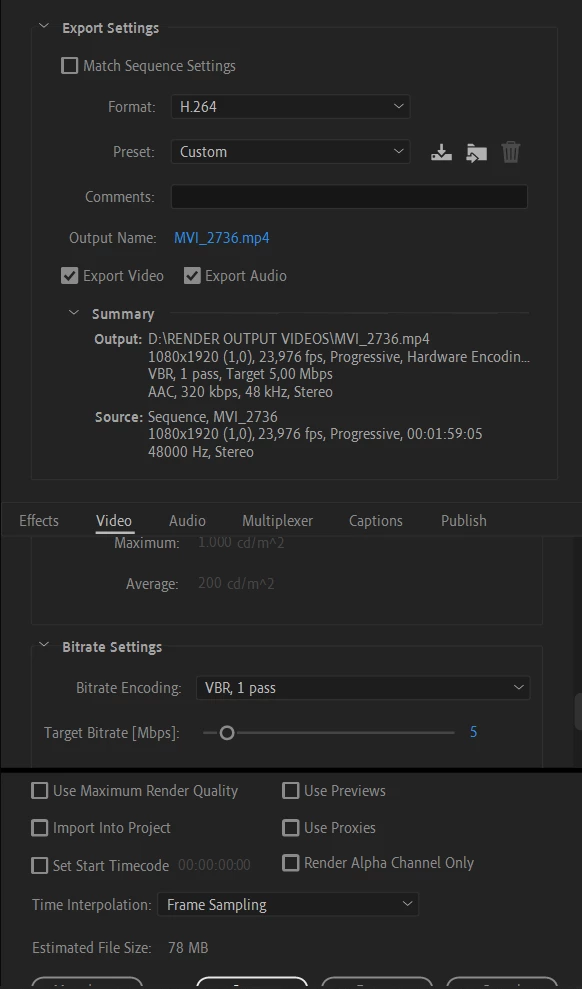
I can't export video files from Adobe Premiere or Media Encoder. Processing happens, but it freezes.

 

Correct answer Sumeet Kumar Choubey

Hi renanrnobrega,


Sorry to hear about this. Is it freezing while exporting in any specific format (like H.264) or is it with all the formats? If it's specific to H.264, try switching to Software Encoding under Export Settings > Video tab > Encoding Settings > Performance.  Let us know if it exports properly after that.


Thanks,

Sumeet

2 replies

Participant
November 5, 2024

Subject: Issue with Adobe Media Encoder

Dear Adobe Support Team,

I am experiencing an issue with Adobe Media Encoder related to file encoding. Every time I try to encode a file to webm format, the file does not encode at all. [I attach the images that appear for you here under the email]. Could you please assist me in resolving this problem?

Thank you for your help.

Best regards,
Amnah


Sumeet Kumar ChoubeyCommunity ManagerCorrect answer
Community Manager
May 13, 2021

Hi renanrnobrega,


Sorry to hear about this. Is it freezing while exporting in any specific format (like H.264) or is it with all the formats? If it's specific to H.264, try switching to Software Encoding under Export Settings > Video tab > Encoding Settings > Performance.  Let us know if it exports properly after that.


Thanks,

Sumeet

Participant
May 13, 2021

Thanks Sumeet, it worked!