Daniel Morrell
Participant
April 17, 2020
Question

frequent Render error using transitions

  • April 17, 2020
  • 2 replies
  • 776 views

Hi,


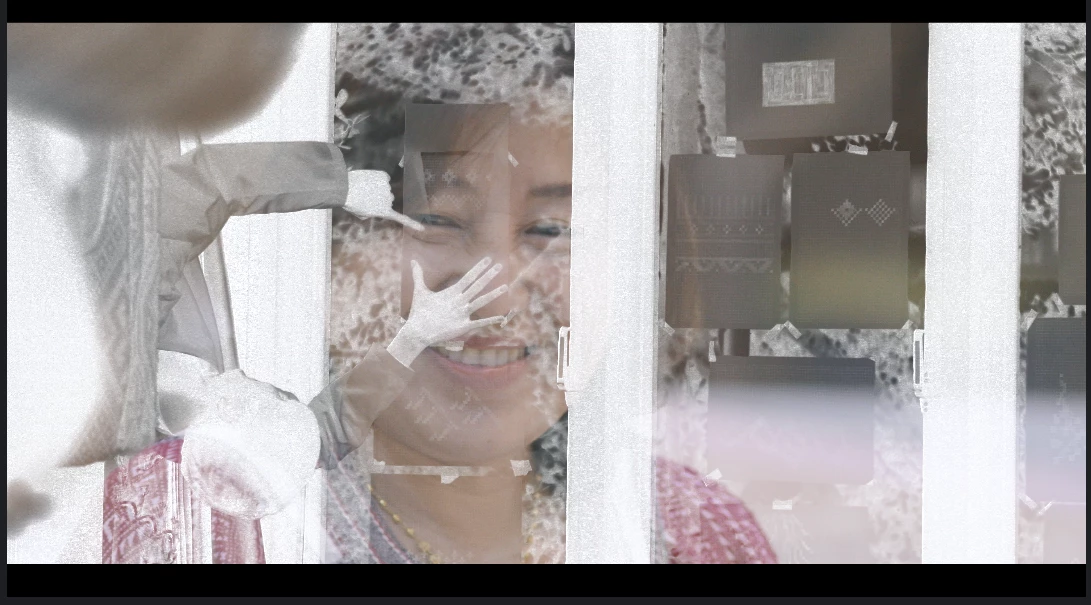
Been finding the same render error happening when outputting my films. It always happens at the end of the film when i'm transitioning from the last video clip to the end title card, so when i'm using a transistion (happened with dip to white and film dissolve). The render is taking a clip from a shot that is further down the timeline (3 mins before in this case) and overlaying it inverted and upside down over the dissolve. Really strange error, any one experienced this before? Frustrating when your render is taking two days to out put (Canon 4k on a mac pro)

thanks
This topic has been closed for replies.

2 replies

Inspiring
April 17, 2020

Cool, that's a great shot! One other thing to try for good measure it so simply remove and reapply the transition. That can also fix corrupt frames. 


Yeah, Proxy Media is great to make editing smoother, but when it comes time to the final render Premiere will use the original media, so in your case transcoding to ProRes or another intermediate codec might be helpful for next time...if you have the storage space for it. I was actually asking about proxies because I recently caused a problem for myself when a couple of my proxies accidentally got relinked to the wrong version of a clip, so while I was editing I used the shots that looked right, but when I exported those clips were showing a different spot in time. It was only when I toggled off proxies in my timeline and saw the same visual issue that I realized what was going on.

Inspiring
April 17, 2020

It sounds like your media cache could have an issue, try following these steps: https://community.adobe.com/t5/premiere-pro/faq-how-to-clear-your-cache-in-premiere-pro-2019/td-p/8324672?page=1


Also, if your video is taking two days to output and this is the only problem section you should set an in and out point and just export the transition area plus a small area around it as a test. This will save you a ton of time when diagnosing the problem.


One other question, are you using Proxy Media with this project? If not, then definitely try clearing your Media Cache.

Daniel Morrell
Participant
April 17, 2020

Thank you for taking time to reply David. I've cleared the media cache as suggested so fingers crossed the render will  be error free this time. 


I rendered out small sections as you suggest after the initial error, couldn't risk another 2 days rendering. Had to find a work around the first time i encountered the error, not ideal though. Hopefully clearing the cache will be the solution i was looking for.


I'm not using proxy media, but probably should be due to the terrible codec of the canon 5d 4k video, looks beautiful though!


alll the best,


Dan


(a shot from my film for the British Council Crafting Futures project)