

Gaussian blur effect locking up effect control panel
I'm seeing two issues that are intertwined related to the Gaussian Blur effect with a tracking mask.
I have a rectangular mask on a gaussian blur effect. As I click "Track selected mask forward 1 frame," it slowly tracks: the buttons grey out, then the frame advances and the mask has (hopefully) moved to track the object (not always, but that's a problem for another day). After some nondeterministic number of clicks of the button (could be 1, could be 10), the track forward/backward buttons grey out as normal, but then nothing happens. The frame doesn't advance, the new keyframe isn't added, and the buttons are no longer clickable. Like so:
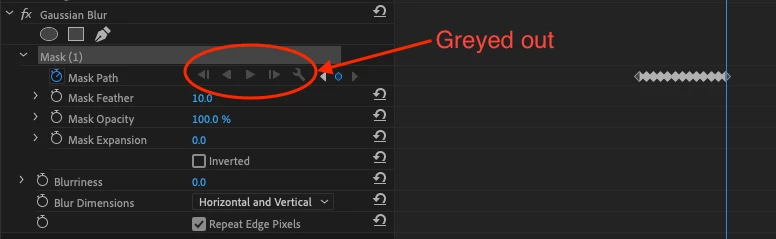
It gets weirder. If I click elsewhere on the timeline, so that the current clip is no longer selected, the Effect Controls panel retains its state from the clip I was working on. Even if I click on another clip, it's still showing me the same Effect Controls panel view from the previous clip that was selected. In order to restore full Effect Controls panel functionality, and to reset the frozen state of the mask tracking, I have to close the Effect Controls panel and then re-open it, at which point everything behaves as normal. This is fully repeatable on multiple clips. The clips have a Lumetri Color filter on them, and the blur is in the effects list below that filter. Not sure if that's relevant?
 AdChoices