Inspiring
June 7, 2021
Resuelto

Get Frame Rate of project Item with Extendscript CEP Panel

  • June 7, 2021
  • 1 respuesta
  • 2436 visualizaciones

Hi,

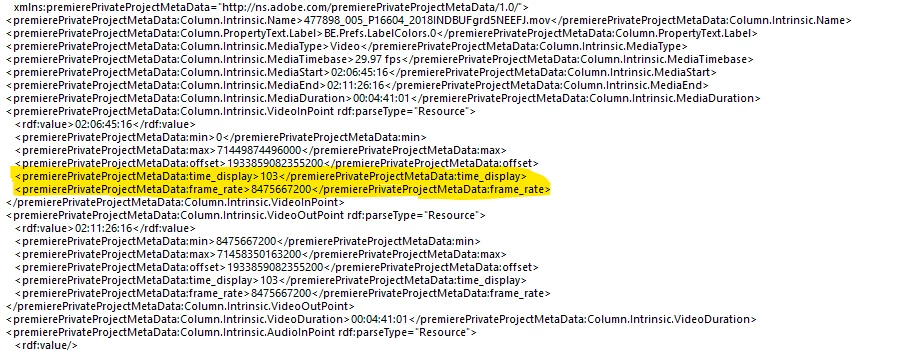
I'm trying to access the "frame_rate" or "time_display" from a clips metadata via Extendscript.  I can see the fields (highlighted below) when I alert projItem.getProjectMetadata but when I try to access those fields independantly (following the example from the sample panel) it doesn't return anything.  See code below.  I know you need "Column.Intrinsic.VideoInPoint" in the URI for the Clip In Point, does anyone know what you need for the highlighted fields?


function getMetaData (clip){
	//alert("Test")
   if (ExternalObject.AdobeXMPScript == undefined){
	   ExternalObject.AdobeXMPScript = new ExternalObject("lib:AdobeXMPScript")
   }
   if (clip.type == ProjectItemType.CLIP){
	   var kPProPrivateProjectMetadataURI	= "http://ns.adobe.com/premierePrivateProjectMetaData/1.0/";
	   var videoInPoint = "Column.Intrinsic.VideoInPoint";
	   var videoOutPoint= "Column.Intrinsic.VideoOutPoint";
	   var frameRate = "Column.Intrinsic.MediaTimebase";
	   var fieldType = "Column.PropertyText.FieldOrder";
	   var mediaIn = "Column.Intrinsic.MediaStart";
	   var mediaOut = "Column.Intrinsic.MediaEnd";
	   var ticks = "frame_rate";
	   
	   var projectMetaData		= clip.getProjectMetadata();
	   var newXMP		= new XMPMeta(projectMetaData);
	   var inPoint	= newXMP.getProperty(kPProPrivateProjectMetadataURI, videoInPoint);
	   var outPoint	= newXMP.getProperty(kPProPrivateProjectMetadataURI, videoOutPoint);
	   var frameRate = newXMP.getProperty(kPProPrivateProjectMetadataURI, frameRate);
	   var fieldOrder = newXMP.getProperty(kPProPrivateProjectMetadataURI, fieldType);
	   var mediaStart = newXMP.getProperty(kPProPrivateProjectMetadataURI, mediaIn);
	   var mediaEnd = newXMP.getProperty(kPProPrivateProjectMetadataURI, mediaOut);
	   var frameRateTicks = newXMP.getProperty(kPProPrivateProjectMetadataURI, ticks);
	   metaData = [inPoint, outPoint, frameRate, fieldOrder, mediaStart, mediaEnd, frameRateTicks]
	   return metaData
}else{

   alert ("No Clip")
}
}


Este tema ha sido cerrado para respuestas.
Mejor respuesta de Bruce Bullis

Hi @Bruce Bullis 

I'm new with extendscript with PPro, but I'm also looking for this info, to use with Time.getFormatted(frameRate, displayFormat) function.

Besides the metadata referred above, the sequence has a Sequence.getSettings() method, that return these attributes (PPro v15.0):

var seqSettingsObj = {
        "audioChannelCount": 2,
        "audioChannelType": 1,
        "audioDisplayFormat": 200,
        "audioSampleRate": {
            "seconds": 0.00002267573696,
            "ticks": "5760000"
        },
        "compositeLinearColor": true,
        "editingMode": "795454d9-d3c2-429d-9474-923ab13b7018",
        "maximumBitDepth": false,
        "maximumRenderQuality": false,
        "previewCodec": "MPIN",
        "previewFileFormat": "EncoderPresets/SequencePreview/795454d9-d3c2-429d-9474-923ab13b7018/I-Frame Only MPEG.epr",
        "previewFrameHeight": 1080,
        "previewFrameWidth": 1833,
        "videoDisplayFormat": 102,
        "videoFieldType": 0,
        "videoFrameHeight": 1090,
        "videoFrameRate": {
            "seconds": 0.03336666666667,
            "ticks": "8475667200"
        },
        "videoFrameWidth": 1850,
        "videoPixelAspectRatio": "1:1",
        "vrHorzCapturedView": 360,
        "vrLayout": 0,
        "vrProjection": 0,
        "vrVertCapturedView": 180,
        "workingColorSpace": {
            "empty": false,
            "isSceneReferred": false,
            "matrixEquation": 0,
            "name": "Rec. 709",
            "primaries": 1,
            "transferCharacteristic": 1
        },
        "workingColorSpaceList": [{
            "empty": false,
            "isSceneReferred": false,
            "matrixEquation": 0,
            "name": "Rec. 709",
            "primaries": 1,
            "transferCharacteristic": 1
        }, {
            "empty": false,
            "isSceneReferred": false,
            "matrixEquation": 0,
            "name": "Rec. 2100 HLG",
            "primaries": 9,
            "transferCharacteristic": 18
        }, {
            "empty": false,
            "isSceneReferred": false,
            "matrixEquation": 0,
            "name": "Rec. 2100 PQ",
            "primaries": 9,
            "transferCharacteristic": 16
        }]
    };


This object has the following attributes of frameRate and displayFormat for audio and video respectively:

....
        "audioDisplayFormat": 200,
        "audioSampleRate": {
            "seconds": 0.00002267573696,
            "ticks": "5760000"
        },
....
       "videoDisplayFormat": 102,
....
        "videoFrameRate": {
            "seconds": 0.03336666666667,
            "ticks": "8475667200"
        },


And I'm wondering if I can use this data with the aforementioned Time.getFormatted method, or I may refer to the metadata info?
And is normal for audio and video to have different display formats?


Thanks in advance.


...I'm wondering if I can use this data with the aforementioned Time.getFormatted method,


Yes, videoFrameRate is a Time object, which includes the getFormatted() method.


And is normal for audio and video to have different display formats?


Yes.


1 respuesta

Bruce Bullis
Community Manager
Community Manager
June 7, 2021

Framerate is available as part of a projectItem's footage interpretation. 


https://ppro-scripting.docsforadobe.dev/item/projectitem.html?highlight=framerate#projectitem-getfootageinterpretation

I think time_display is driven off of sequence settings, not data intrinsic to a projectItem.


Inspiring
June 7, 2021

Yes I know however the metadata field called frame_rate has a different value than the frame Rate from getFootageInterpretation.  You can see in the picture i posted.  I believe its in ticks per second.  Any idea how I would access those fields?


Bruce Bullis
Community Manager
Community Manager
June 7, 2021

You'll note that frame_rate occurs ~10 times in the private metadata for any given projectItem; frame_rate is a member of the in/out points, as well as SoundTimeCode. 

var kPProPrivateProjectMetadataURI  = "http://ns.adobe.com/premierePrivateProjectMetaData/1.0/";

if (ExternalObject.AdobeXMPScript === undefined) {
   ExternalObject.AdobeXMPScript = new ExternalObject('lib:AdobeXMPScript');
}

var first = app.project.rootItem.children[0];  

if (first) {
   var projectMetadata = first.getProjectMetadata();
   if (projectMetadata) {
       var projectMetadataAsXMP = new XMPMeta(projectMetadata);
       if (projectMetadataAsXMP) {
           var exampleFieldName = "Column.Intrinsic.AudioInPoint";
           var inPointInfo = projectMetadataAsXMP.getProperty(kPProPrivateProjectMetadataURI, exampleFieldName);
           if (inPointInfo) {
               var inPointVal   = inPointInfo.value;  	
           }
       }
   }
}


For premierePrivateProjectMetaData:time_display values, it'll be one of the following (taken from the PProPanel sample). 

var TIMEDISPLAY_24Timecode = 100;
var TIMEDISPLAY_25Timecode = 101;
var TIMEDISPLAY_2997DropTimecode = 102;
var TIMEDISPLAY_2997NonDropTimecode = 103;
var TIMEDISPLAY_30Timecode = 104;
var TIMEDISPLAY_50Timecode = 105;
var TIMEDISPLAY_5994DropTimecode = 106;
var TIMEDISPLAY_5994NonDropTimecode = 107;
var TIMEDISPLAY_60Timecode = 108;
var TIMEDISPLAY_Frames = 109;
var TIMEDISPLAY_23976Timecode = 110;
var TIMEDISPLAY_16mmFeetFrames = 111;
var TIMEDISPLAY_35mmFeetFrames = 112;
var TIMEDISPLAY_48Timecode = 113;
var TIMEDISPLAY_AudioSamplesTimecode = 200;
var TIMEDISPLAY_AudioMsTimecode = 201;