

MyerPj
Community Expert
Community Expert
May 14, 2020
Answered

Get rid of "Get more out of Premiere Pro" startup screen

  • May 14, 2020
  • 9 replies
  • 2830 views

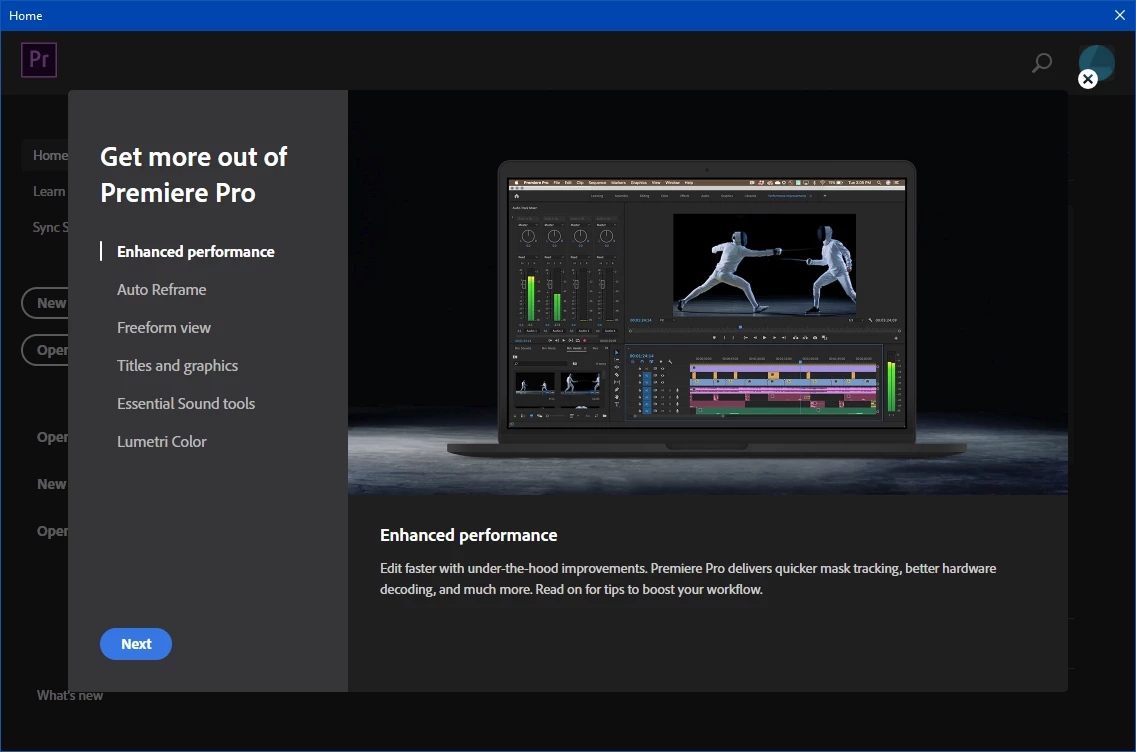
I can't get rid of this startup screen on my main machine. Everytime I go into PP for the first time since a boot, I get this screen. My tester doesn't do this. I've stepped thru all the tabs on this screen many times, deleted prefs, deleted 14.0 folder, copied in the 14.0 folder from my tester. I still can't get rid of it. It may have started in cc2019, but I can't remember now it's been so long. Any tips? Testing for it is a pain because I have to reboot each time to see if whatever works. (PP 14.1 - Win 1909)


    This topic has been closed for replies.
    Correct answer MyerPj

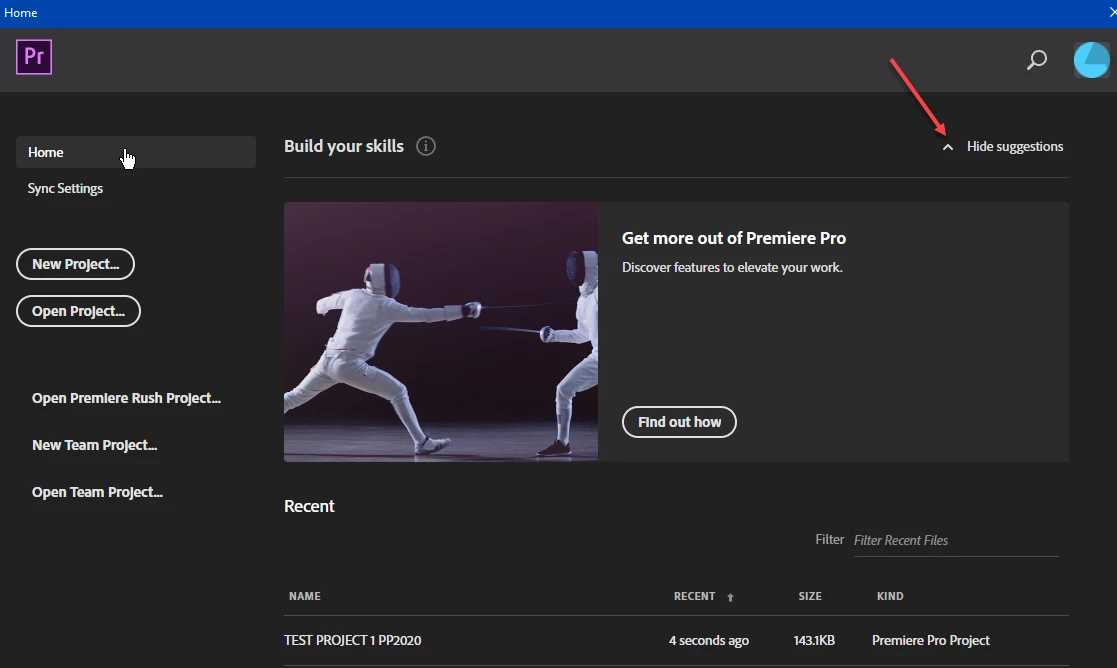
    OK, I was a little too enthusiastic and a lesser annoyance still shows. At least they reduced it to a smaller portion - and some of the recent projects show w/out doing anything. But the "Hide Suggestions" button is always inactivated on first boot of the day (and of course remains so unless you click it to hide suggestions). But even with that it comes back on first start of PP every day.


    9 replies

    Participating Frequently
    September 4, 2020

    Reseting the preferences doesn't work

    Reinstalling Premiere doesn't work

    Reinstalling CC doesn't work

    Reinstalling Windows 10 Pro 64 doesn't work


    Can we get an Adobe employee to tell us that they can't replicate the bug and that we'll have to deal with it?

    R Neil Haugen
    Legend
    May 29, 2020

    I don't have this problem, that window never pops up for me. Wonder what the difference is in settings somewhere?


    Neil

    Everyone's mileage always varies ...
    Inspiring
    June 23, 2020

    Came to this thread to ask the same question. Every time I open PP, this nag screen shows up and I can't get rid of it. I don't want to know How to Get More out of Premire Pro. I just want to start working.

    MyerPj
    Community Expert
    MyerPjCommunity ExpertAuthor
    Community Expert
    May 29, 2020

    Yes, it's definetly still here, doubled (ie: needs two clicks now to get rid of the promo windows). One to get rid of the full window as you are displaying and then the 1/2 window. So you must also click the 'Hide Suggestions' once a day/reboot.


    Participant
    May 28, 2020

    I too have the same issue. It's not a huge deal, but with PP crashing for various reasons, it is irritating to be constantnly nagged about What's New! Started happening on 14.2.0

    MyerPj
    Community Expert
    MyerPjCommunity ExpertAuthorCorrect answer
    Community Expert
    May 22, 2020

    OK, I was a little too enthusiastic and a lesser annoyance still shows. At least they reduced it to a smaller portion - and some of the recent projects show w/out doing anything. But the "Hide Suggestions" button is always inactivated on first boot of the day (and of course remains so unless you click it to hide suggestions). But even with that it comes back on first start of PP every day.


    MyerPj
    Community Expert
    MyerPjCommunity ExpertAuthor
    Community Expert
    May 21, 2020

    Ha, ha... finally! It started in cc2019, The "Get More out of Premiere Pro" window has greeted me first launch after a boot for over a year... finally just stopped on it's own with PP 14.2. So, wasn't me after all!


    🙂

    MyerPj
    Community Expert
    MyerPjCommunity ExpertAuthor
    Community Expert
    May 18, 2020

    Strange problem. Just wondering if anyone else has seen this non-threatening annoyance!:)

    Just Shoot Me
    Legend
    May 16, 2020

    I must ask Why is this question in the Back Room forum?

    This should be in the general Premiere Pro forum.

    The back room is a restricted forum for ACP's MVP's and staff for posting notices and problems with the forum and regular users, Name Change, Deactivate and the like.

    You may get the answer you are looking for in the Program Specific forum.

    MyerPj
    Community Expert
    MyerPjCommunity ExpertAuthor
    Community Expert
    May 16, 2020

    If you look at the last sentence of the message right above your name/post, you'll see the answer, I guess you missed/didn't read it? If you need more explanation I can provide! :0)


    Perhaps go back to advocating changes to this forum, and get us the <Delete> button back like we had in Jive. 🙂


    Stan Jones
    Community Expert
    Community Expert
    May 14, 2020

    Win 10, but still 1903. Reset preferences gets that pix/"Get more out of Premiere Pro" in the upper right. I have to click on the "Find out how" link in that panel to see what you see.


    No idea how to get that! I'd consider a full uninstall, cleaner, reinstall - but worry that even that would not find the tiny code/setting in some non-preferences folder that would pop it up!


    Stan 

    MyerPj
    Community Expert
    MyerPjCommunity ExpertAuthor
    Community Expert
    May 16, 2020

    Good point Stan, thanks for that. I probably won't go that far as otherwise it's working as expected. Does seem like it would be hard to track down. 


    I meant to post this on the PP forum, if someone happens to see this and put it over there.