
Participant
May 20, 2019
Question

GOP length and Format Profile Option

  • May 20, 2019
  • 2 replies
  • 3512 views

Hi there,

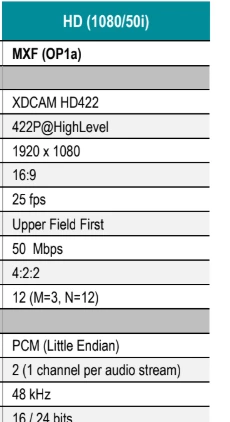
I am trying to export a video in Premiere Pro 19 for a European broadcaster. In the screenshot below you can see the requirements.

However I can't seem to find an option to adjust the GOP Length (which client needs to be 12 (M=3, N=12) and Format Profile (which should be 422P @ High Level).

Also when I export the file, while the footage looks fine the graphics that appera on top of the footage are distorted/blurry. Any idea of what might be causing this please? Many thanks
2 replies

Participant
March 2, 2021

Hi I have the exact same specs I need to work to - did the solution below work? If you could let me know what settings you used to comply that would be amazing!


Chris

Ann Bens
Community Expert
Community Expert
May 20, 2019

If you check Force Fixed Length GOPS you will get what you are asking.

Do a test run and check with Mediainfo.

Participant
May 21, 2019

Thanks Ann,

even if I check that option I don't get the option to adjust the M and N paramaters.

How I can do that?

Also any idea on where I can change the Format Profile to 422P @ High Level please?

Finally,  are the graphics not looking good when I export because the Mac screen cannot show the interlaced video properly maybe?

Many thanks for any help with this,

Silvia

Ann Bens
Community Expert
Community Expert
May 21, 2019

The option is backed in.

Do a test run and check the file with MEDIAINFO.