This topic has been closed for replies.
Correct answer BagusSetya11300410069fa6

What was the solution?


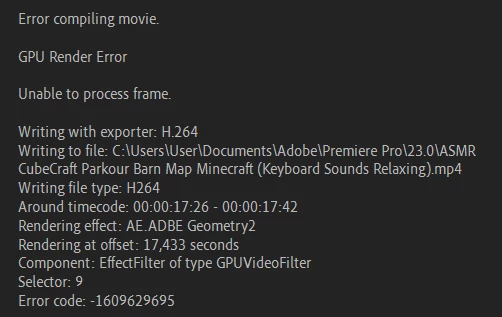
I just delete some image on my timeline and it work.

4 replies

Community Manager
July 13, 2023

Hi @BagusSetya11300410069fa6,

Sorry for the problem. Was this resolved ? Please share Premiere Pro version/Device details also. It will be good if you can share your media/project files here https://helpx.adobe.com/creative-cloud/help/share.html. We will investigate and report back.


Thanks,
Mayjain

Inspiring
July 13, 2023
Its already resolved.
Peru Bob
Community Expert
Community Expert
June 9, 2023


 Go to Preferences > Media and deselect Enable hardware accelerated decoding (requires restart).


from here:

https://helpx.adobe.com/in/premiere-pro/kb/error-compiling-movie-rendering-or.html

Peru Bob
Community Expert
Community Expert
June 9, 2023

Try updating or rolling back your graphics driver directly from the video card manufacturer’s site. If NVIDIA, do a clean installation of the latest Studio Driver (NOT the Game Driver)

kglad
Community Expert
Community Expert
June 9, 2023

in the future, to find the best place to post your message, use the list here, https://community.adobe.com/


p.s. i don't think the adobe website, and forums in particular, are easy to navigate, so don't spend a lot of time searching that forum list. do your best and we'll move the post if it helps you get responses.


<moved from using the community>