Valentin Salja
Participant
May 4, 2021
Question

GPU Render Errors - Can't render anymore

  • May 4, 2021
  • 3 replies
  • 1308 views

Hey guys, pretty urgent problem, pls help in any way you can.


I just can't render anymore in Premiere Pro. It's the latest version, I keep getting this message over and over again. It happened 7 times already. So basically, I can sometimes render this file but most of the time I can't. Also, the error comes out sometimes at the begining of the render process but most of the time on 99% mark which is infuriating because it takes Premiere 35 mins to render so I lost the entire day just trying to get this out.


The hardware is fine, it's a great computer and Resolve works perfectly on it. And Premiere sometimes works and sometimes just doesn't on the same file. What do I do here?
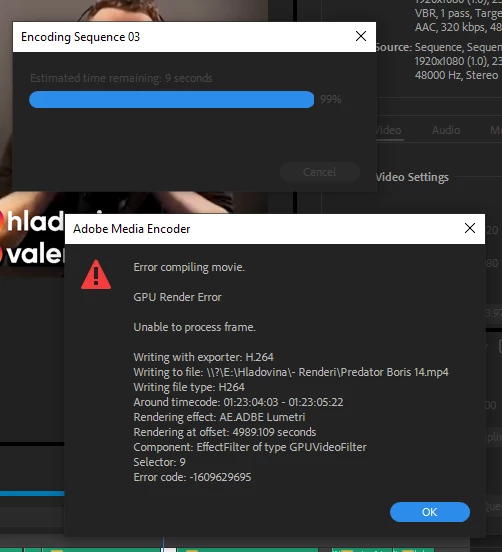
 

This topic has been closed for replies.

3 replies

Peru Bob
Community Expert
Community Expert
May 4, 2021

What graphics card?

What driver number?

Valentin Salja
Participant
May 4, 2021

Nvidia GeForce RTX 3080

Studio Driver Version: 462.31 - Release Date: Wed Apr 14, 2021

Ann Bens
Community Expert
Community Expert
May 4, 2021

Make new project and import old one then try again.

You need to check Lumetri at the given time in the error message.

Valentin Salja
Participant
May 4, 2021

Jeus Christ when I switch off the GPU for rendering (found a "tip" on YouTube) it says 4 hours of render time?! What the hell is going on? Should I just never use Lumetri?

Peru Bob
Community Expert
Community Expert
May 4, 2021

If NVIDIA graphics,, make sure to use the latest Studio Driver from NVIDIA (NOT the Game Driver).

Valentin Salja
Participant
May 4, 2021

I already installed it because of previous issues when Premiere couldn't playback any footage but this is now a new problem.