
udow86883912
Participant
March 16, 2018
Answered

Green and Pink Video in Premiere Pro 12.0.1 (Build 69)

  • March 16, 2018
  • 17 replies
  • 101140 views

Hi,

I'm editing a video since 2 weeks, everything was fine until today. I opened Premiere and all my clips look green/pink.

I didn't change anything, but yesterday Windows Update installed a new video driver "Intel Corporation - Display - 2/28/2018 12:00:00:00 AM - 23.20.16.4973".

I think the problem is a result of the new driver?

Do I need to update a codec?

Or should I remove the display driver?

What can I do?

Thanks for your help.

Greets Udo
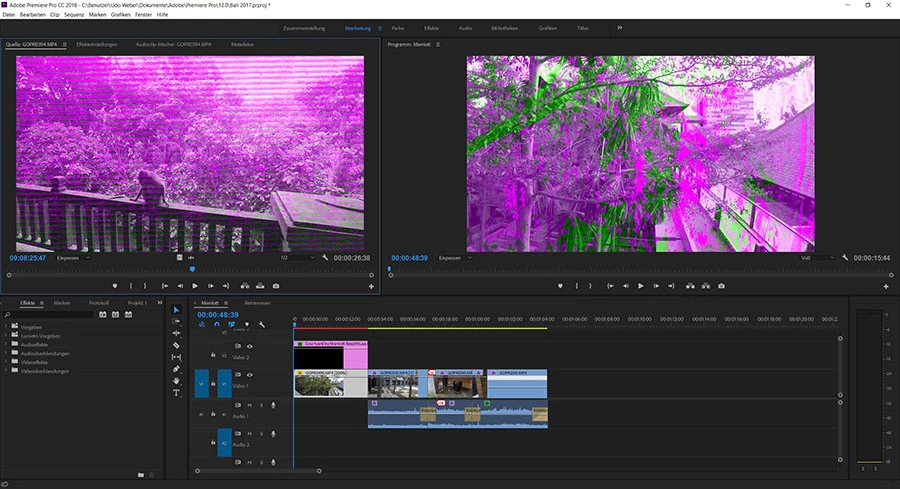
This topic has been closed for replies.
Correct answer udow86883912

Ok, I found two older versions here


Version: 15.65.4.4944 (Latest)  not working

Version: 15.60.2.4901 (Latest) <----- WORKS


Interesting, both are called latest 

So the newest intel driver seems to have a problem with Premiere.

What’s now? Let the oldest installed can be a temporally solution but not forever!?

Greets Udo

17 replies

ofirk3515504
Participant
July 18, 2018

It happens to me also in After Effects

How can I arrange it?

danield25085521
Participant
June 30, 2018

I switched my settings to that. But my problem is when Im exporting. Some of my clips are good. Some have the green and pink. With effects or none????HELP

Participant
September 9, 2018

Same here. Did you figure it out?

Participant
May 23, 2018

I just started to have this same problem this morning. The files were fine when I began this morning, then suddenly switched to the green and pink tint

I'm on a work computer, and there's no way a driver was updated this morning (updates don't happen randomly and without some sort of notice)

Thoughts?

Participant
May 23, 2018

HERE'S THE SOLUTION FROM ADOBE: You have to change the video rendering setting.

Premiere Pro

File > Project Settings > General > Video Rendering and Playback > (choose from dropdown) Mercury Playback Engine Software Only

Media Encoder

File > Preferences > General > Video Rendering > (choose from dropdown) Mercury Playback Engine Software Only

This is a known bug in the current version and will be addressed in the next upgrade.

I spent two days with our IT department and 1 hour with Adobe support trying to figure this out. For now, the resolution is a pretty simple fix. No need to update any drivers, hardware, or software.

Participant
May 29, 2018

Thank you for posting this! Fixed the issue.

Participant
May 16, 2018

Thanks, installing the other driver helped me too.

The affected PC uses only the onboard graphics of the i5-7500, in other words the HD630, and this helped:

"Version: 15.60.2.4901 (Latest) <----- WORKS"

Grigor Poghosyan
Participating Frequently
March 17, 2018

Trash your preferences.

Legend
March 16, 2018

I would advise against using the built-in Intel GPU for editing.  Install a 1000 series GTX card from vNidia.

udow86883912
Participant
March 16, 2018

Great solution, change hardware and problems are gone

Luckily, we are in an Adobe forum, otherwise your solution would be to change the software.

With answers like this you got Level 8.... ahhh, ok

Legend
March 17, 2018

Great solution, change hardware and problems are gone

Sometimes, yeah.

I believe this is one of those times.

udow86883912
Participant
March 16, 2018

Additional Info Intel® HD Graphics 530, so a very common on a Chip

  • Adapter CompatibilityIntel Corporation
  • Video ProcessorIntel® HD Graphics Family
  • Resolution2560 x 1440
  • Bits Per Pixel32
  • Number of Colors4294967296
  • Refresh Rate - Current59 Hz
  • Refresh Rate - Maximum75 Hz
  • Refresh Rate - Minimum23 Hz
  • Driver ProviderIntel Corporation
  • Driver Version23.20.16.4973
  • Driver Date28.02.2018
  • Adapter DAC TypeInternal
  • Adapter RAM1,00 GB
  • AvailabilityRunning at full power
  • StatusThis device is working properly.
  • LocationPCI bus 0, device 2, function 0
  • Device IdPCI\VEN_8086&DEV_1912&SUBSYS_79711462&REV_06\3&11583659&0&10
udow86883912
Participant
March 16, 2018

Mmm ok, I uninstalled this driver and installed the old one, but w/o success.

Any idea?

udow86883912
udow86883912AuthorCorrect answer
Participant
March 16, 2018

Ok, I found two older versions here


Version: 15.65.4.4944 (Latest)  not working

Version: 15.60.2.4901 (Latest) <----- WORKS


Interesting, both are called latest 

So the newest intel driver seems to have a problem with Premiere.

What’s now? Let the oldest installed can be a temporally solution but not forever!?

Greets Udo