
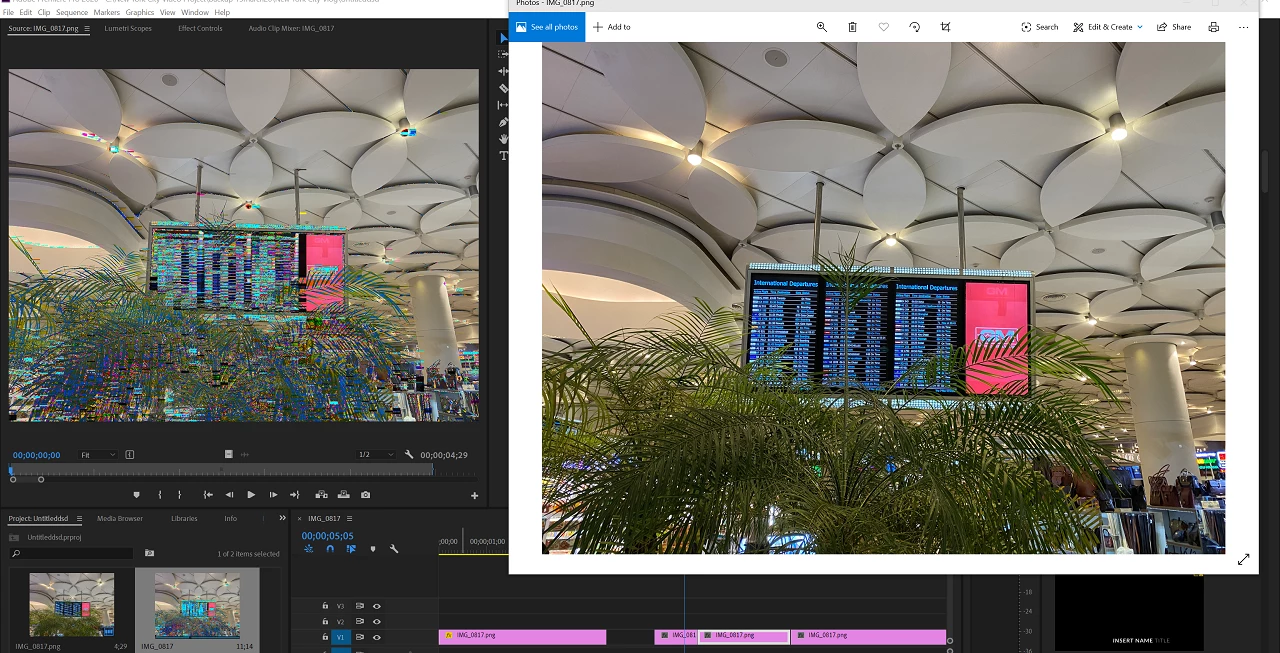
Green, pink color distortion glitch while importing images to premiere pro version 14.1
I have a macbook pro 2019 16inch model with I9 cpu and AMD 5500m graphics.
My windows is up to date, drivers are up to date and previously I was using premiere pro cc 2020 version 14.0.1 build 71 and currently I updated it to the latest version but I still see the exact same issue. Please see the attached image - the left side is the image I see in source monitor and also in the output, the right side image is the actual image.
This only happens if i keep mercury playback gpu acceleration ON
If I turn it to software only - it works perfectly.
Also, the issue is only with the images, videos work fine.
The problem is my projects are huge, I cant use software only as its too slow and there is no point wasting so much time.
Update: Opening the images in photoshop and exporting them as jpg solves the issue when i import the new image in premiere but I cant do this all the time as I have 100 images, all of them taken from my iphone11
Please help.
 AdChoices