
tuilorraine
Inspiring
March 21, 2019
Question

Grey and white diagonal lines and no preview

  • March 21, 2019
  • 3 replies
  • 5079 views

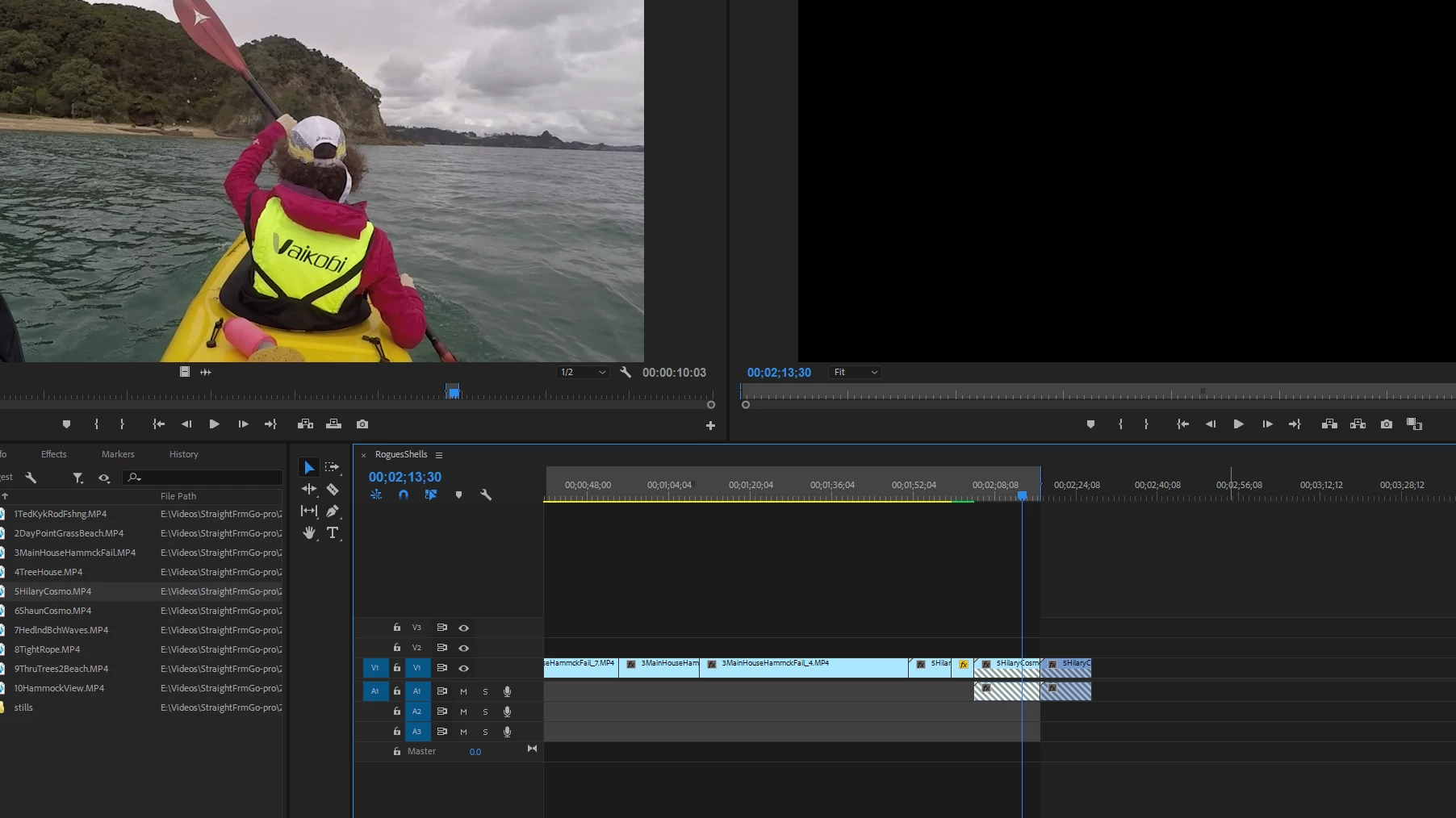
In the image inserted you can see that the clip has grey and white diagonal lines and the preview pane is black. Why is this and how to I fix it? Notice the problem occurs straight after a section where the thin yellow line under the timeline ruler is green instead of yellow because I did some kind of "render" process that I followed instructions for.
I tried deleting the media files and media cache files manually but the problem persists.
    This topic has been closed for replies.

    3 replies

    Legend
    March 21, 2019

    That's the Missing Media indicator.  It tells you there used to be media associated with that portion of a clip or sequence, but now there isn't.

    It usually happens when a clip is linked to the wrong file on the hard drive.

    Community Expert
    March 21, 2019

    The question has been asked before as below:

    Grey diagonal lines "danger stripes" over part of footage in timeline? Help please!

    In the above case, it was a broken clip reference that could be fixed with Clip > Replace with Clip.

    Jon-M-Spear
    Legend
    March 21, 2019

    They're Danger Stripes.  They usually indicate that the linked media doesn't have enough content to fill timeline track.