
Participant
September 9, 2025
Answered

Grey or transparent subtitles

  • September 9, 2025
  • 2 replies
  • 191 views

I can't change the color of the subtitles to white in version 25.4.1


Here's the screenshot.
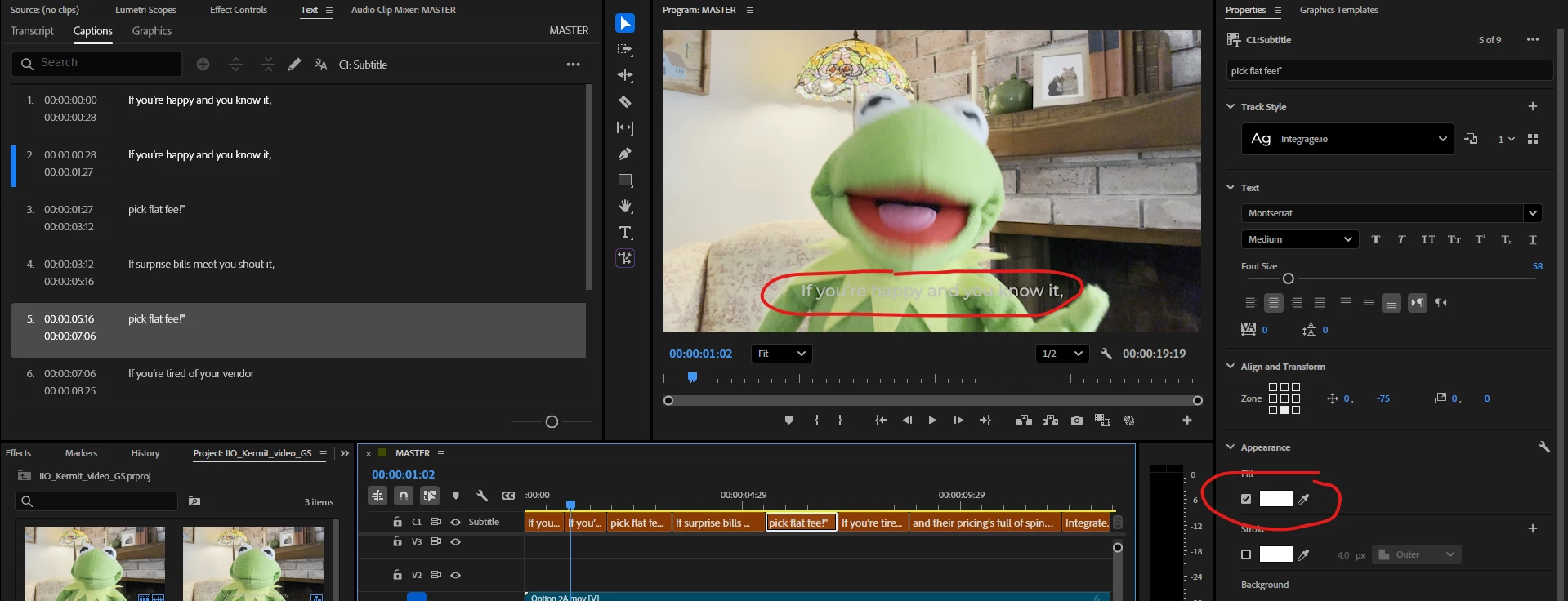

It looks that the text should be white #FFFFFF but on the preview is grey. Why? I'm used transcript to create captions.

Correct answer grzegorzs98704387

I've soved it. I don't know why but the project opened as an HDR color format. I turned it to SDR and it's OK

2 replies

R Neil Haugen
Legend
September 9, 2025

Premiere's new color management is a huge step forward, but of course, as in anything human created, not without bumps.


And graphics is one of those items. There are several situations that can trigger graphics being of lower brightness for 'white' than expected, and even having tried, I cannot always reproduce them "on command". Which is frustrating to me also.


There are several things that can help in that moment ... going to the Lumetri panel's new Settings tab, the home of ALL of Premiere's extensive color management options from input through sequence/export.


Selecting the graphic, sometimes simply using the Clip option to disable color management or "Preserve RGB" for that clip works.


Sometimes going to the Input Override section, ticking the Media Override setting, and selecting say the top option, the Arri wide option ... will fix it.


There are a couple other things for certain very specific issues that I  won't take time to explain, but the above will get most graphics displayed correctly.


And yes the staff is aware that there are some issues here.

Everyone's mileage always varies ...
grzegorzs98704387AuthorCorrect answer
Participant
September 9, 2025

I've soved it. I don't know why but the project opened as an HDR color format. I turned it to SDR and it's OK

Stan Jones
Community Expert
Community Expert
September 9, 2025

@grzegorzs98704387,


Thanks for posting your solution. There's a longish thread recently where the off-white color to captions is because (according to one user) is because they are not color managed in the same way as other elements. But I think these were not SDR.


Stan