
rjandersson
Participant
April 27, 2019
Question

Greyed out clips in timeline (danger lines) after transferring project to another PC

  • April 27, 2019
  • 3 replies
  • 5454 views

I use the project manager to export the project, with all clips and caches included. I delete the clips as I have them on the other PC's HDD, theoretically I could just link them afterwards.

When I open the project on the other PC and link media, certain clips are greyed out like this:
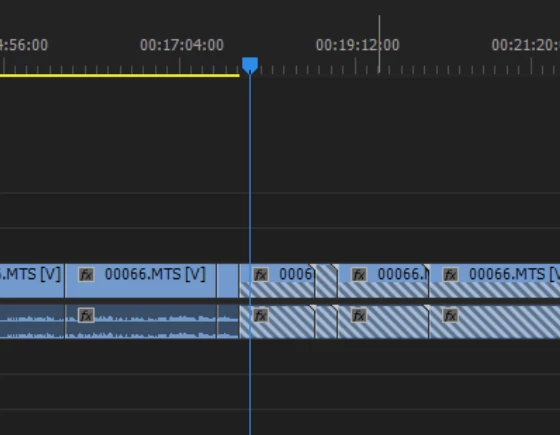
Why is this happening and how can I fix it?

- Transferring from OSX to Windows 10

- Both are using Premiere pro CC 2019

So far I have tried without success:

  1. Exporting the project and transferring the files to the other PC w/o deleting the media (didn't work)
  2. Making greyed clips offline and relinking them
  3. Relinking clips from a different area on the HDD
  4. Renaming the project file each time
  5. Deleting cache files
  6. Replacing media from bin (fixes, but not well as the clip begins from the start of the media)

Premiere seems to think the in/out of each clip is at a different point on the media. I don't know why it happens for certain clips, but I've tried everything I can think of/find. I need to be able to edit on my laptop while on the go, and then be able to transfer it to my PC in order to render/apply effects.

    This topic has been closed for replies.

    3 replies

    Inspiring
    September 30, 2023

    Alternatively, there's a padlock icon in between the columns on your clips. If you click on it accidentally it will lock the clip and make it uneditable. So if you're seeing the "Danger lines" moving from left to right ///, make sure the padlock is open and not closed.

    Ann Bens
    Community Expert
    Community Expert
    July 20, 2021
    January 7, 2022

    Hi all, I just came across the "danger line" issue on a timeline and found a solution. Sony FS7 footage. Media transfer between hard drives.


    I found a solution to my specific issue that may help other Sony shooters or editors working with Sony footage on Premiere. When shooting with two cards, and when one card is nearly full, Sony cameras "split" the last clip in two parts, keeping the SAME CLIP NAME on both cards. This resulted in a card based confusion on Premiere and the infamous danger lines for me. I did the "offline-relink" trick a few times with no result, until I realized the problematic clip  was the last on card 1 (long interview). I then relinked with the first clip on Card 2, which has the exact same name. All danger lines disappeared.

    Hope this helps.

    Best,

    Marc

    Participant
    July 20, 2021

    Did you end up finding a fix for this?