
Participant
December 12, 2021
Question

H.264 Export Error

  • December 12, 2021
  • 4 replies
  • 399 views

Hello Guys.

I was using the new 2022 version of Premier Pro which is quite good.

But I am having problems exporting.

1st AVI is too heavy.

2nd MPEG 4 is good in size but not so much in quality.

3rd Lots of people recommend H.264 but it just syas Error 3 
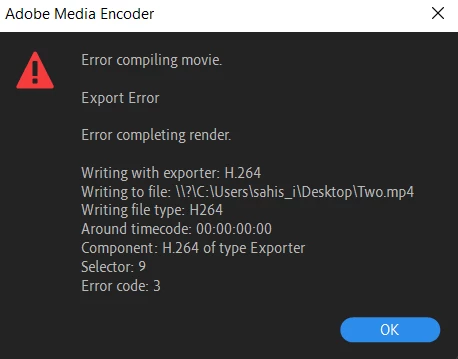
Any solutions?


Thanks,

Sahishnu

This topic has been closed for replies.

4 replies

Warren Heaton
Community Expert
Community Expert
December 15, 2021

Hello Sahishnu222104189lpb:


Is this happening in just this project or all of your Premiere Pro projects? 


Since you're able to export an AVI, use that to create an MP4 from Adobe Media Encoder (just drop the AVI file into the Queue tab).  Once the MP4 file is made from the AVI and you've checked that it plays as expected, you can delete the AVI.


It's not ideal to do it in two steps, but at least you'll have the smaller file that should have good picture quality.

Legend
December 15, 2021
Kartika Rawat
Community Manager
Community Manager
December 15, 2021

Hi Sahishnu!

Sorry about Error compiling movie. Could you try switching to Software Encoding instead of Hardware Encoding in the Export Setting > Video tab > Encoding Settings and export.


Let us know how it goes.


Thanks,

Kartika

Ann Bens
Community Expert
Community Expert
December 12, 2021