
pabitrab85988450
Participant
July 10, 2018
Answered

Hardware Acceleration Not working on Premiere Pro

  • July 10, 2018
  • 2 replies
  • 1825 views

I am using Premiere Pro 2018 12.1.1.10 but recently the Hardware Acceleration while rendering the video is not working and the rendering speed is very slow.

Before few months this issue was not there.
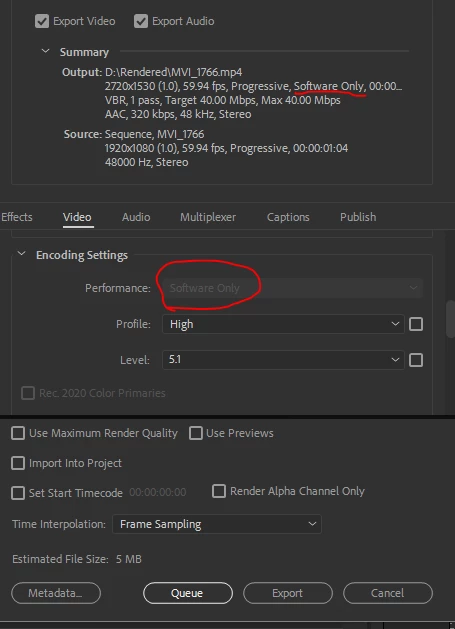
Its showing software only, and i cannot change that.

My PC specs:-

CPU: Ryzen 5 1600X

GPU: Nvidia GTX 1060 6GB

RAM: 8 GB DDR4 2400Mhz

Motherboard: Asus B350 Prime

Windows 10 Pro

    This topic has been closed for replies.
    Correct answer R Neil Haugen

    That is an Intel CPU thing related ONLY to whether your CPU has the new Quick-Sync hardware.

    It has nothing whatever to do with PrPro using your GPU. Period.

    It has nothing whatever to do with Mercury Acceleration either.

    IF you have GPU accelerated effects on your sequence and a GPU that is capable of supporting such work PrPro is using it as always whether or not that bit in the Export summary about the CPU hardware in your computer says hardware or software only.

    Neil

    2 replies

    R Neil Haugen
    R Neil HaugenCorrect answer
    Legend
    July 10, 2018

    That is an Intel CPU thing related ONLY to whether your CPU has the new Quick-Sync hardware.

    It has nothing whatever to do with PrPro using your GPU. Period.

    It has nothing whatever to do with Mercury Acceleration either.

    IF you have GPU accelerated effects on your sequence and a GPU that is capable of supporting such work PrPro is using it as always whether or not that bit in the Export summary about the CPU hardware in your computer says hardware or software only.

    Neil

    Everyone's mileage always varies ...
    John T Smith
    Community Expert
    Community Expert
    July 10, 2018

    Do not count on Windows to be fully up to date when it comes to device drivers

    Go to the vendor site to be sure you have an updated driver for your graphic adapter

    •nVidia Driver Downloads http://www.nvidia.com/Download/index.aspx?lang=en-us

    There are also intermittent reports that the newest driver is not always the best driver due to driver bugs or compatibility issues, so you MAY need to try an earlier driver version