


Participant
July 6, 2026
Answered

Hardware decoding for 4:2:2 10-bit .MXF files on Blackwell GPUs?

  • July 6, 2026
  • 2 replies
  • 32 views

What's the latest information on when Adobe plans to add support for hardware decoding of 4:2:2 10-bit .MXF files on Nvidia Blackwell GPUs?

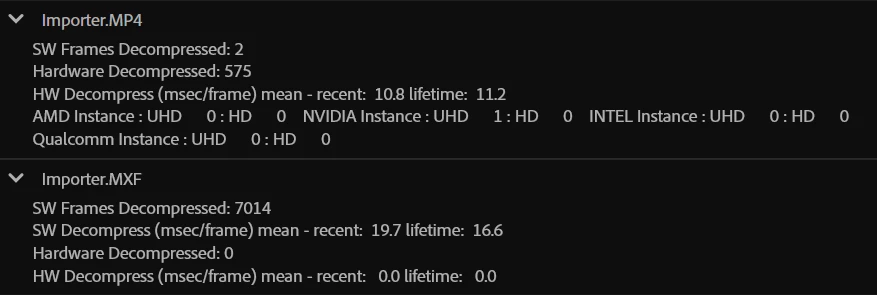
Attached is a screenshot from Premiere's debug monitor. I played footage from a Sony A7S III wrapped as .MP4 (X-AVC S 4:2:2 10-bit 3840x2160 23.978) and footage from a Sony FX6 wrapped as .MXF (X-AVC I 4:2:2 10-bit 3840x2160 23.978). You can see in "Importer.MP4" that hardware decoding is being used for the .MP4 footage, and in "Importer.MXF" that hardware decoding is NOT being used for the .MXF footage.

I'm not sure if this is a bug, or if Adobe simply hasn't added this feature yet.
I am on Premiere 26.3.0 and Nvidia Studio Driver 610.62. GPU is RTX 5060 Ti 16GB. OS is Windows 11.



    Correct answer caroline_edits

    Hey ​@andrewp ! Hardware acceleration for H.264/HEVC on the Blackwell cards has been shipped in the official release, but the MXF support is still in beta.

    Try it in beta and let us know how it goes! 

    Caroline

    2 replies

    caroline_edits
    Community Manager
    caroline_editsCommunity ManagerCorrect answer
    Community Manager
    July 21, 2026

    Hey ​@andrewp ! Hardware acceleration for H.264/HEVC on the Blackwell cards has been shipped in the official release, but the MXF support is still in beta.

    Try it in beta and let us know how it goes! 

    Caroline

    Inspiring
    July 7, 2026

    No idea, but as a shooter of MXF for the last 5 years, I’ve learned to rewrap to mov/proress, Premiere seems to never get along with MXF.


    LLMs have been pretty good at helpimg me get the best out of FFmpeg. 

    ffmpeg -i input.mxf \
    -map 0 \
    -c:v prores_ks \
    -profile:v 3 \
    -pix_fmt yuv422p10le \
    -vendor apl0 \
    -bits_per_mb 8000 \
    -c:a pcm_s24le \
    -movflags +faststart \
    output.mov

    or single line: 
    Powershell: ffmpeg -i "input.mxf" -c:v prores_ks -profile:v 3 -pix_fmt yuv422p10le -c:a pcm_s24le "output.mov"

    etc.