


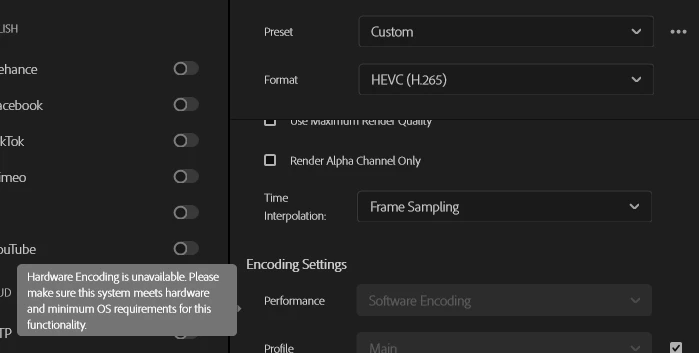
Hardware encoding is unavailable in Premiere Pro 25.4.1
CPU Ryzen 5600x
Nvidia 2060 Super
Hi everyone. I encountered an issue while doing my usual stuff. I didn't do anything uncommon, just my usual workflow. Software always autoupdates to the latest version. Usually exporting process take about 20 minutes. But this time I've waited for hours just to encounter an error while rendering.
So what is the issue?
I tried H264, H265, Apple prores 422. Tried the same thing in AME. I tried segmented rendering and it don't stop at the same place. I tried layered rendering and found out that the issue is the rendering of Lower thirds I made in AE. They always worked fine and I didn't make any changes on them. So I tried rendering the footage only layer and it worked fine. The idea was to render the lower thirds layer separately with alpha channel, so I could add it later. And it did got stuck again. I tried updating the mogrt file by creating newer version with the newest version of after effects. Saved it on cloud/drive/local library. Same result.
So what could be the problem? I noticed that hardware encoding is greyed out:
After googling, chatgpting, surfing the adobe forum I tried few things:
Cleaning the cache of both ae and premiere pro
Clean installing the drivers of nvidia
rebooting thousands of times
installing premiere version of 24.5
Holding shift while launching the app to clean the cache and delete preferences
Creating new project and new composition using adobe built in footage it still doesn't let me render using hardware.
Same goes for AME
And without that my Essential graphics can't be rendered.
I tried rendering still images, adobe footage with a rollerblades person, my footage
Still doesn't let me choose the hardware encoding.
 AdChoices