Participant
May 12, 2020
Question

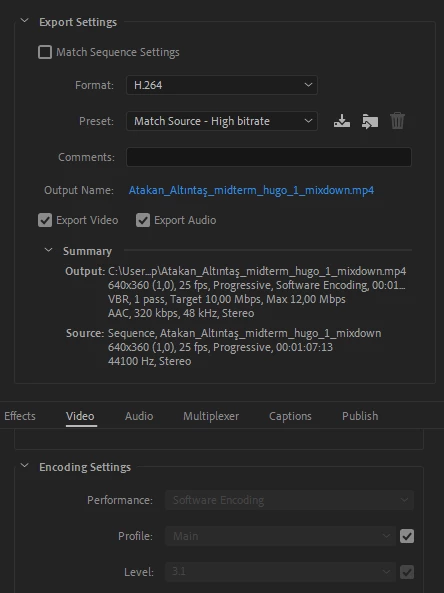
Hardware encoding is unavailable premiere pro 2020

  • May 12, 2020
  • 7 replies
  • 33999 views

I cannot choose hardware encoding. Even i choose gpu at the begining, program in only working and exporting from cpu. 
 

This topic has been closed for replies.

7 replies

Participant
October 25, 2021

Moderator Note: Link removed. Sorry. Please do not use Console to change the application. It is against our corporate guidelines and is a request from Adobe Premiere Pro engineering.

Participant
October 29, 2020

I'm surprised they decided to support Intel's Quicksync before Nvidia' NVENC which apparently has better quality (1). As an alterntaive you can export to a somewhat lossless format like ProRes (HQ preferred) or to a true lossless format like Ut Video then compress using any other the free utilities that support other hardware accelerated encoders. For example Handbrake supports NVENC, AMD's VCE, and Intel Quicksync.  


source 1 - https://obsproject.com/forum/threads/comparison-of-x264-nvenc-quicksync-vce.57358/page-3#post-251456)

Ann Bens
Community Expert
Community Expert
August 8, 2020

Make sure you have the latest driver installed and hareware encoding is checked in the Pref.

BMcCarty
Known Participant
August 8, 2020

Thank you for your respones, but as I mentioned, I am running the latest driver. The problem is that there is no option to select hardware encoding. The encoding option is set to software and is greyed out. 

Participant
August 11, 2020

I had the same problem. But it turned out it was a video non 1080p (it was 1336p), so no hardware encoding for me.

BMcCarty
Known Participant
August 8, 2020

I'm having the same issue. The encoding selector is greyed out in Premiere Pro. I do have hardware acceleration in Media Encode through, and H.264 export is REALLY fast! Now if I could just get the same thing going in Premiere. 

UPDATE: Forget what I just said. I transcoded some ProRes files to H.264 MP4 in Media Encoder and that was really fast, but Queuing a sequence to ME and exporting an H.264 resulted in the same glacially-slow Media Encoder performance we all know and "love" - even though ME shows hardware acceleration is active. And I have a GTX1080 card and am runnning the latest Nvida driver, so everything should be working properly.  

Inspiring
August 8, 2020

Can you check if you have the latest Premiere and Encoder versions? That was the problem for me, I installed them but kept opening the previous ones, which had encoding greyed out.

BMcCarty
Known Participant
August 8, 2020

Thanks for the tip. I believe I'm runnig the latest, but I'll double-check. 

Inspiring
May 21, 2020

I think I got it, at least on my end - I didn't notice but Windows opened previous installed version of Premiere, hence the feature not being available. When you open an old project with 14.2, it should ask you to update it for the new version - that's how you know. Or you can just check the "about" section in the menu to see the version number.


Once I launched 14.2, it worked! Test video that took me 16 seconds to export an hour ago now took 9 seconds with hardware encoding enabled.

R Neil Haugen
Legend
May 12, 2020

The Mercury Acceleration setting in the Project dialog ... CUDA, Metal, Software Only ... doesn't currently have anything to do with H.264 encoding in an export.


The "Software encoding" line in the Summary for this version of Premiere only refers to whether or not you have an Intel CPU with the built-in QuickSync hardware available for the H.264 encoding process.


The Mercury Acceleration setting has to do with the use of GPU accelerated effects such as Warp Stabilizer, color correction, and frame-size changes.


Neil

Everyone's mileage always varies ...
Inspiring
May 21, 2020

That is not what they asked about though. Latest version (14.2) added hardware GPU acceleration that specifically boosts H264/HVEC encoding. Based on Pugetsystems analysis, it improves encoding speed by 2x-4x.


As a sidenote, it's also greyed out for me currently, looking for a solution.

Jeff Bugbee
Community Expert
Community Expert
May 12, 2020
