

Brave_guide01AC
Known Participant
August 29, 2021
Answered

Help! Can't drag audio

  • August 29, 2021
  • 1 reply
  • 59995 views

Suddenly, with no warning, Premiere Pro has modified the behavior when I drag clips from the media browser into the timeline. They only drag the video portion, with no audio tracks. The clip shows a white box around the "drag video only" icon and I'm unable to select the "drag audio only" icon, though it does show the audio track if double clicking. Trying to drag the audio doesn't work at all. I'm using a 2020 MacBook Pro with Premiere Pro 15.1.0


I'm working on a time-critical project and this is really giving me a headache. Any suggestions?
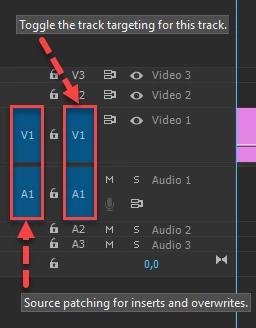
Correct answer Ann Bens

The most common user error is not source patching the track.
Solved by first opening clip in Source Monitor. Then drag/insert into timeline.

1 reply

Brave_guide01AC
Known Participant
August 29, 2021

So I've identified that this happens with all my mp4 files. Video files created on my iPhone as native .mov files do drag both the video and audio tracks to the timeline, but none of my mp4 files will do that. If I convert an mp4 to mov, it behaves like an mp4 and doesn't drag the audio. This is driving me nuts! 

Ann Bens
Community Expert
Ann BensCommunity ExpertCorrect answer
Community Expert
August 29, 2021

The most common user error is not source patching the track.
Solved by first opening clip in Source Monitor. Then drag/insert into timeline.

Brave_guide01AC
Known Participant
August 29, 2021

After seeing your reply I noticed that v3 video track had v1 highlighted (far left column) instead of v3 (to right of lock icon). Weird but that solved the issue. Thank you so much!